About this addon
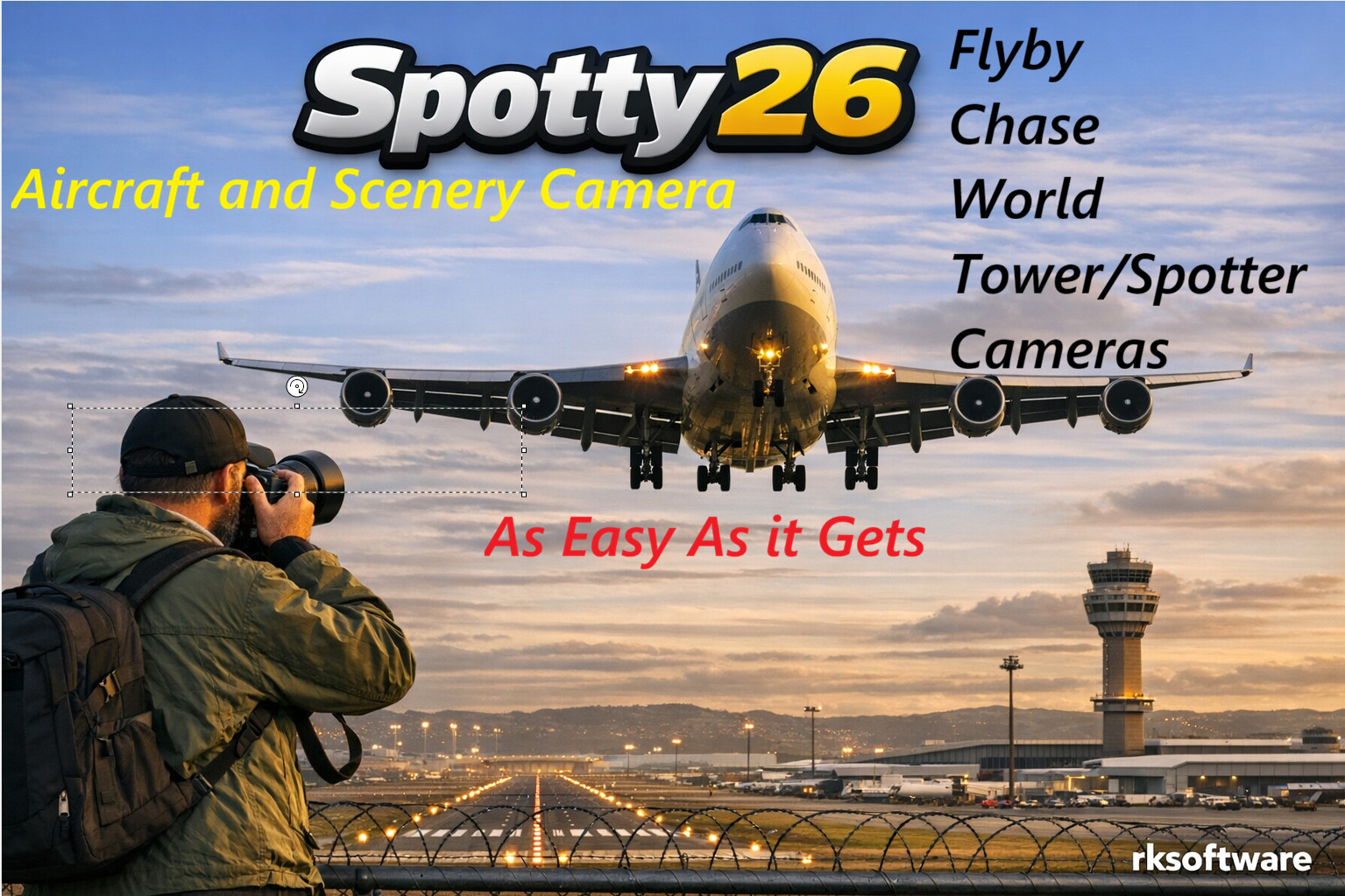
Your MSFS 2024 Camera tool for easy Airplane Spotting and Scenery Exploration
Spotty26 transforms MSFS 2024 into a visual playground. Whether you're chasing airplanes or admiring handcrafted scenery, Spotty26 makes it effortless.
Save Your Favorite Spotting sites
Bookmark and reload your top Spotting sites for instant access to your favorite airports and scenic hotspots. Whether you're a scenery scout, aviation enthusiast, or content creator, Spotty26 brings precision and ease to your MSFS experience.
Here are some of Spotty26’s key capabilities:
- Easy to use Flyby, Chase, World and Tower cameras.
- Move Spotty cam’s location with your controller or keys on the keyboard.
- Flexible Spotty Locations: Begin spotting at Airports or user-defined locations, with full control over altitude and direction. • Live Aircraft Markers: View user aircraft and AI aircrafts movement on the map.
- View AI Traffic with Spotty26’s camera and select any for a close look of any AI aircraft.
- Save and Load Spotting sites
With the World or Tower camera active, select a location on the map and save it as a Spotting site. Load saved Spotting sites with a click on a saved camera marker on the Spotty26 Map.
Changelog
hangelog v1.5.0 > v1.5.1 ✅ Further improvements of Traffic Board features. ✅ Auto View Landing and Takeoff should now work after implemented new codes. ✅ Fixed issues for user that are not using the FSLTL Traffic injector - Traffic Board with limited feature should now work. Spotty26 continues its journey toward becoming a **must-have utility for every MSFS 2024 flyer**, whether you're into plane spotting, cinematic flybys, AI traffic tracking, or simply enjoying the world from the perfect camera angle. As always, feedback and suggestions are welcome. Enjoy the update and happy flybys and aircraft spotting! ✈️
Changelog v1.4.1 > v1.5.0 ✅ Further improvements of camera handling and selection. ✅ Fixed some bugs related to saving and loading Spotties. ✅ Changed icons for saved World and Tower cameras. ✅ Improved joystick setup for Honeycomb Alpha/Bravo and similar flight controls. Spotty26 now correctly detects toggle switches that remain in the ON position. Fixed button assignment issues affecting some yokes, throttles, and flight panels. ✅ Improvements to the Traffic Board - now released as a development version. Not all functions are working yet. Stable version will come in v1.6.0 Spotty26 continues its journey toward becoming a **must-have utility for every MSFS 2024 flyer**, whether you're into plane spotting, cinematic flybys, AI traffic tracking, or simply enjoying the world from the perfect camera angle. As always, feedback and suggestions are welcome. Enjoy the update and happy flybys and aircraft spotting! ✈️
Changelog v1.4.0 > v1.4.1 Improved camera handling and selection as is had too many bugs introduced in v1.4.0. Implemented ONE-CLICK feature to lock active camera on selected aircraft either from map or from Traffic Board.
Changelog v1.3.2 > v1.4.0 🚀 **Spotty26 Update Available!** 🚀 A new Spotty26 update is now available, bringing several new features, usability improvements, and bug fixes for MSFS 2024 plane spotters and camera enthusiasts. ### ✨ New Features ✅ Added user activation for support for Global Hotkeys so user defined keystrokes can be used for all camera modes (Flyby - FlybyO - Chase - World -Tower) when Spotty26 is minimized to Taskbar or out of focus. Important note when using Global Hotkeys: Spotty26 will highjack activated hotkeys and cause issues with other running programs. Global Hotkeys in Spotty can be toggled ON/OFF easily. ✅ Added support for configuring additional joystick buttons: * D-Pad Up * D-Pad Down * D-Pad Left * D-Pad Right ✅ Added new assignable joystick actions: * Camera Zoom In * Camera Zoom Out * Altitude Up * Altitude Down ✅ Added **FlybyO (Cinematic Flyby)** button to Spotty26 UI. ✅ Added **FlybyO** support on the Xbox Controller Right Thumb button for instant cinematic flyby sequences. ### 🎥 Camera Improvements * Chase, World, and Tower camera panels can now be shown or hidden by repeatedly activating the same camera mode. * Works from the Spotty26 UI, keyboard, joystick buttons, and Xbox controller. * Camera movement behavior has been significantly improved for keyboard, joystick, and controller users. Movements now feel much more natural and intuitive. ### 🗺️ Map Improvements * Disabled automatic map centering when selecting aircraft markers, making traffic monitoring and aircraft selection easier. ### 🔧 Other Improvements * Various bug fixes and stability improvements throughout the application. * Updated Spotty26 User Guide (PDF). Spotty26 continues its journey toward becoming a **must-have utility for every MSFS 2024 flyer**, whether you're into plane spotting, cinematic flybys, AI traffic tracking, or simply enjoying the world from the perfect camera angle. As always, feedback and suggestions are welcome. Enjoy the update and happy flybys and aircraft spotting! ✈️
Changelog v1.2 > v1.3.1 Fixed bug when trying to zoom with keystroke. Added new Traffic Board that should work with all AI injector apps. Added detection of Joysticsk to configure Spotty26 cameras to joystick buttons. Fixed bug in FlyBy-O for cinematic view Added Radar Radius setting for user set AI traffic detection. Added Spotty26 window size automatically start up with the window size it had when it last closed Other bug fixes. Updated Spotty26.pdf.
User Reviews

Avhead
VerifiedJun 21, 2026
Just what I was looking for, love it
Discovery1
VerifiedJun 2, 2026
Actually, I didn't want to buy this tool because I already have another one from a competitor on Simmarket. But after watching the preview video, I decided to buy it after all, and I'm happy with it. It’s easier to use, and you can click on any aircraft to view it. It’s as if you were standing next to the aircraft, walking or driving past it. This is exactly what I was looking for. Now I can finally create my own videos of aircraft and more.
Spotty26
Spotty26 is a camera tool designed for Microsoft Flight Simulator 2024, allowing users to spot airplanes and explore scenery with customizable camera modes. It offers Flyby, Chase, World, and Tower cameras, all controllable by keyboard or controller. Users can save and reload their favorite spotting locations with full control over altitude and direction. The tool also features real-time aircraft markers and the ability to view AI or user aircraft movement for enhanced observation.

Instant digital delivery • Secure payment
Requirements
Additional Requirements
- Microsoft Flight Simulator 2024
More by this publisher
Details
- Category
- Utilities
- Release Date
- May 11, 2026
- Last Updated
- Jul 8, 2026
- Reviews
- 2
- Compatibility
- MSFS2024