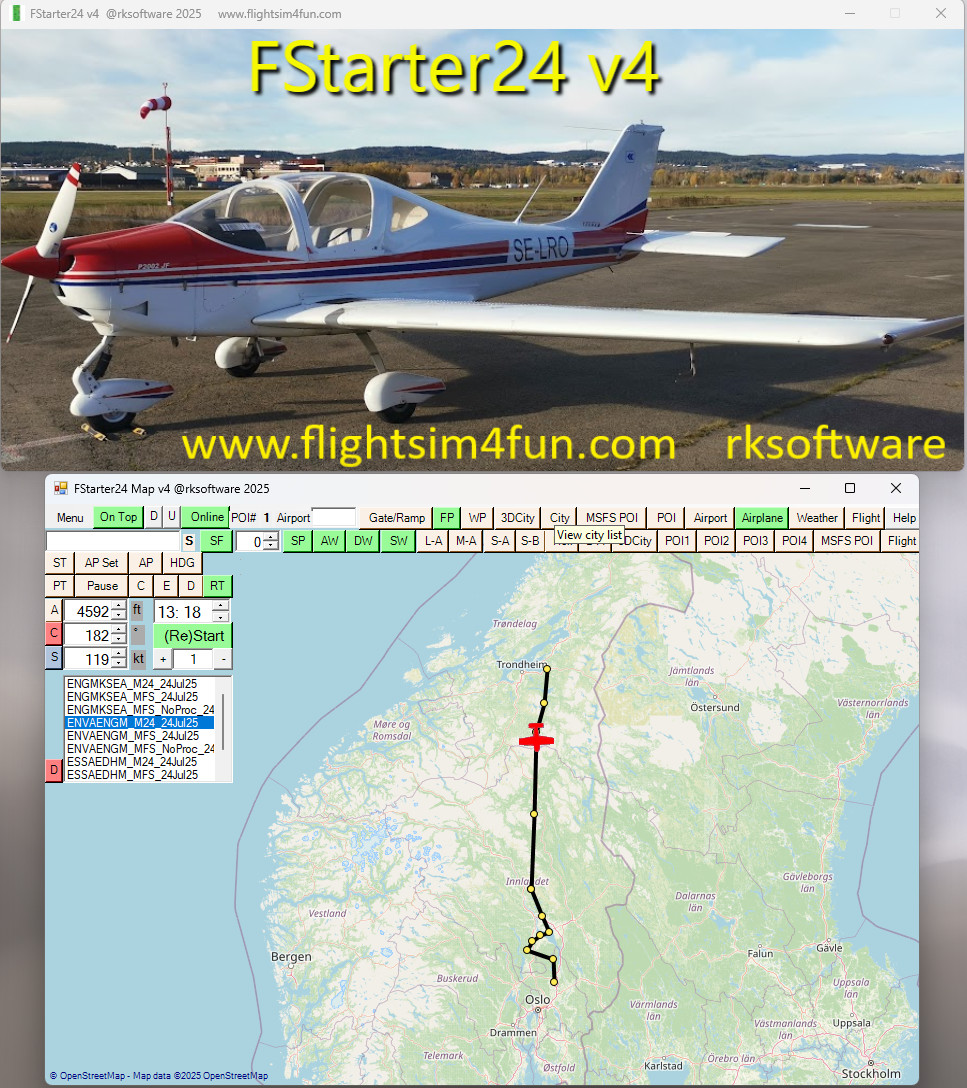
About this addon
FStarter24 has a lot of features and is a very powerful multi-tool to use with MSFS2020 and MSFS2024
- 1. Start flights and explore any world location in MSFS:
- Fast start flights and explore the stunning world in Microsoft Flight Simulator.
- Start flight in MSFS from any selected location on the FStarter24 MAP.
- 2. Create user POIs (Point of Interests):
- Select any location on the map or use the active flight location and create it as a user POI.
- Save your favorite locations, whether it’s your house, school, cabin, or an airport runway.
- 3. Flight Situations:
- Start flights in the air or on the ground at any altitude, heading and speed.
- Define specific situations, such as an airport traffic pattern (Final, Downwind, Base, Entry),
complete with altitude, distance, and speed settings. Create any type of flight situation.
- 4. Interactive Maps and Lists:
- View and manage your own user POIs, MSFS 3D cities, MSFS POIs, and MSFS flights.
- Observe your airplane’s movement on the map.
- 5. Flexible Start Locations and flight data:
- Start flights at or near the location of 3Dcities, cities, MSFS POIs, or your user POIs.
- Set any altitude, heading, speed, and time for the flight.
- 6. Custom Approaches and Landings:
- Create custom approaches, landings, or traffic patterns at any airport.
- Train and repeat your flights until you can land in any type of situation.
- 7. Save and load flights:
- Save and load flights to/from map markers using complete MSFS situations and stored data.
- 8. User POI Lists:
- Utilize up to 4 user POI lists, allowing you to add thousands of user POIs.
- 9. Live Aircraft Marker:
- View your airplane’s movement with a dynamic marker on the map.
- 10. Time and Sim Rate:
- Set time of day and/or Sim Rate.
- 11. Import FlightPlans:
- View SimBrief generated flightplans and select any waypoint to start your flight or re-fly any
segment of the flightplan.
- View SimBrief generated flightplans and select any waypoint to start your flight or re-fly any
- 12. Create and load Waypoints to / from MAP:
- WPs to let the AI pilot fly the airplane to and between waypoints.
Changelog
FStarter24 v4.1 - Fixed issues for some users that got map Access Block messages when using the map.
Bug fixes Improved User Interface Added MSFS flightplan support Added all MSFS POI and 3DCity pr. August 2025 Updated documentaion
User Reviews

jcuellars
VerifiedJul 6, 2026
When is going to be available V5?

Barney52
VerifiedApr 24, 2026
Overwhelming! The Swiss Army Knife for the Microsoft Flight Simulator. Lots of new features. One giant leap for SIM-kind
jiminiz
VerifiedFeb 12, 2025
Hi, this utility is great to teleport to other waypoints in a flightplan. The input is a flight plan and not from MSFS avionics or in-game. My flightplan gets reprocessed in avionics and turns to a mess. I have used ftsarter24 v2 several times and teleports perfectly. Kudos for this great utility !!!
FStarter24 V4
FStarter24 V2 is a comprehensive multi-tool designed for Microsoft Flight Simulator 2020 and 2024, offering a range of features to enhance the flight experience. Users can initiate flights from any location on a detailed map, create and manage user-defined Points of Interest (POIs), and define specific flight situations with customized parameters. Additional tools include the ability to save and load flights, create custom approaches, and import flight plans, making it a versatile solution for flight simulation enthusiasts.

Instant digital delivery • Secure payment
Requirements
Additional Requirements
- MSFS2020 / MSFS2024
More by this publisher


Details
- Category
- Utilities
- Release Date
- Jan 1, 2025
- Last Updated
- Mar 21, 2026
- Reviews
- 3
- Compatibility
- MSFS2020/24