About this addon
AeroLens Lite Stream Deck Profile
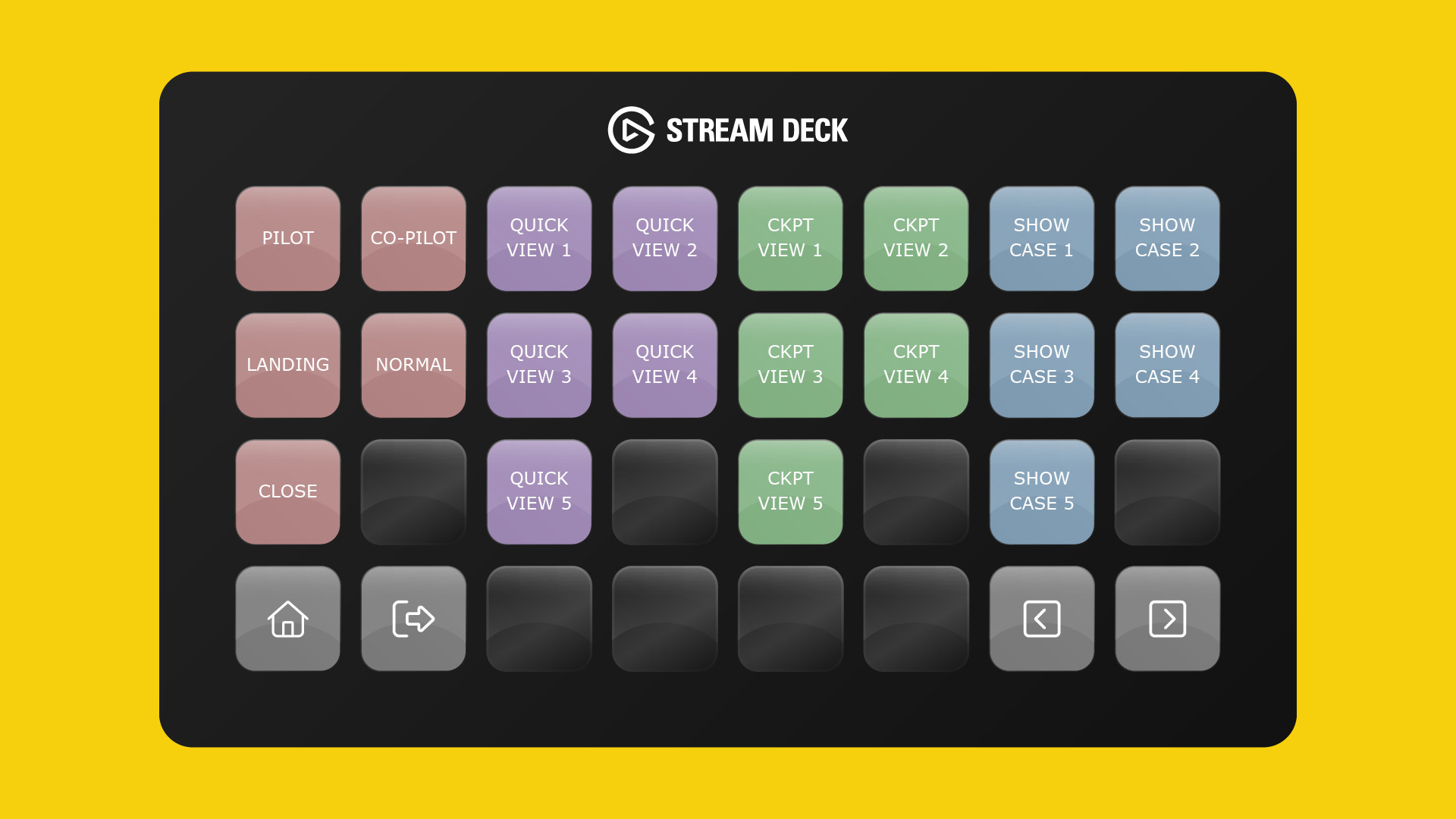
Introducing AeroLens Lite for the Stream Deck XL, Classic, MK.2 and Stream Deck Mobile for iOS and Android. AeroLens Lite is our non-aircraft specific camera management tool that provides quick and efficient access to cockpit, quick view, instrumentation, showcase and custom cameras.
What's more, our comprehensive drone control panel allows you to management movement directly from your Stream Deck with precision, allowing you to get the perfect shot time after time.
If you're looking for additional camera controls, custom views (developed by Flight Panels) and aircraft specific buttons, check out our AeroLens Pro and AeroLens Pro Enhanced products here!
This is a non-aircraft specific Stream Deck Profile which includes both 15 and 32 key variants to support the Stream Deck XL, Classic, MK.2 and Stream Deck Mobile for iPadOS.
Note: You can now add a dedicated AeroLens Button to an existing Flight Panels Stream Deck Profile by downloading our free AeroLens Pro Button Pack. Click here for more information.
Product Features
- 5x Cockpit Camera Controls
- 5x Quick View Camera Controls
- 5x Instrumentation Camera Controls
- 5x Showcase Camera Controls
- 10x Custom Camera (Save) Buttons
- 10x Custom Camera (Load) Buttons
- Individual Colour Coded Buttons
- Home & Profile Switcher Buttons
- Drone Control Panel
About Flight Panels
Our mission is to become an integral part of any Microsoft Flight Simulator setup, through the creation of professional, highly detailed, modern and consistency designed Stream Deck profiles, which maximise the immersive experience of Microsoft Flight Simulator. Our focus on user design, user experience and product research, backed by regular product updates and dedicated industry leading support - is there to provide our community with the confidence that a key part of their Flight Simulator setup will be regularly updated and supported.
Frequently Asked Questions
Q: Do you provide regular product updates?
We regularly update our Stream Deck Profiles to include new features, functionality and bug fixes and we're delighted to provide these free of cost, for the duration of the products lifespan. Announcements are also published on our Discord server and Release Notes are available on our product updates blog.
Q: What if I need support?
We provide free industry leading support by email (support[at]flightpanels.io), Discord and Live Chat (available on the bottom right hand corner of each webpage). On average, we respond to support requests in less than 15 minutes!
Q: How are your products installed?
Installation is performed through the Flight Panels All-In-One Installer, which automatically installs and configures third party applications (FSUIPC7, PilotsDeck, .NET Runtimes etc.) to make installation a breeze.
Q: How is the product licensed?
This product is for personal and home use. For commercial use and/or where used to generate revenue (directly or indirectly) a commercial license is required. Please contact support[at]flightpanels.io for further information.
Q: How can I keep up to date with the latest news?
Blog: https://flightpanels.io/blog/news
Product Updates: https://flightpanels.io/blog/product-updates
Support Portal: https://support.flightpanels.io
Instagram: https://instagram.com/flightpanels
Threads: https://threads.net/flightpanels
Discord: https://flightpanels.io/discord
Changelog
Release Notes: https://flightpanels.io/blogs/product-updates/code-signing-certificate-updates-2026
User Reviews
No reviews yet. Be the first to share your experience!
AeroLens Lite - Stream Deck Profile
AeroLens Lite is a specialized Stream Deck profile designed for Microsoft Flight Simulator, compatible with Stream Deck XL, Classic, MK.2, and Mobile. This non-aircraft specific tool offers quick access to various camera controls, including cockpit, quick views, instrumentation, and custom perspectives. It also features a comprehensive drone control panel for precise movements. Available in both 15 and 32 key variants, AeroLens Lite enhances your camera management capabilities during flight simulation.

Instant digital delivery • Secure payment
Requirements
Additional Requirements
- Microsoft Flight Simulator 2020/2024 (Steam or Microsoft Store)
- Stream Deck XL, Stream Deck MK.2, Stream Deck Mobile or Xeneon Edge
More by this publisher
Phenom 300E Stream Deck + Autopilot Panel
Miscellaneous
€ 21,25
ATR 72-600 Stream Deck + Autopilot Panel
Miscellaneous
€ 13,42
AeroLens Pro Enhanced - TFDI Designs MD-11 - Stream Deck Profile
Miscellaneous
€ 27,95
Stream Deck Series: 787 Dreamliner
Miscellaneous
€ 27,95
Stream Deck Series: Cessna 172 Skyhawk (G1000) (FS2024)
Miscellaneous
€ 29,06
Details
- Category
- Miscellaneous
- Release Date
- Feb 1, 2026
- Last Updated
- Jun 9, 2026
- Compatibility
- MSFS2020/24