About this addon
Current Version:
For Microsoft Flight Simulator
CowanSim R66 v3.5 (2/13/26)
Compatibility Notice:
This product is designed for MSFS2020 but is compatible with MSFS2024. If starting cold & dark (engine/s off), use Shift + C to enter the cockpit on PC and if you’re on Xbox use LB + B. The EFB (tablet) can be used to adjust options, though some overlap issues persist. An official version tailored specifically for MSFS2024 will be released following the completion of its development. The MSFS2024 version will include new features exclusive to the 2024 release.
🚨 ATTENTION PMS GTN650/750 USERS (PC) 🚨
- 👉 DELETE the OLD PMS CowanSim packages from your Community folder (if used)
- 👉 INSTALL the NEW PMS CowanSim packages (required)
- 👉 (already included in your product download)
- ❌ Old PMS CowanSim packages = REMOVE THEM
- ✅ New PMS CowanSim packages = USE THESE
CowanSim R66 – Fly Light. Fly Smart. Fly Anywhere.
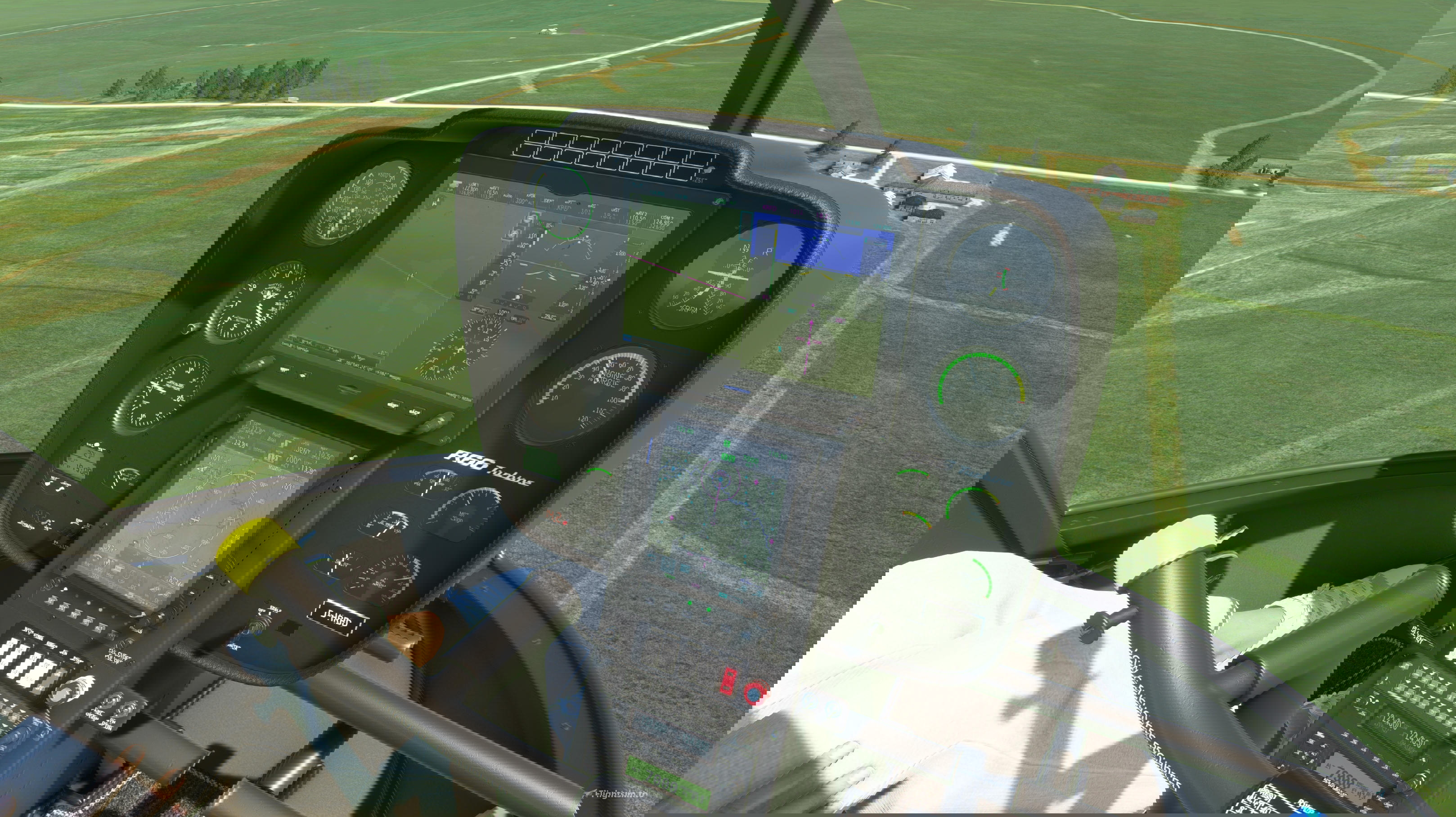
Experience next-generation helicopter realism in Microsoft Flight Simulator with the CowanSim R66, a light turbine utility helicopter built for versatility, agility, and immersion. From private flying to utility missions, the R66 delivers the perfect balance of power and control.
The CowanSim R66 is the result of thousands of hours of development, pilot feedback, and refined coding. Every system, animation, and performance detail was crafted to bring this helicopter to life with realism and reliability in mind. This latest version introduces the new SAS Autopilot System for reduced workload, smoother handling, and precise control in every phase of flight.
For more detailed guidance, please consult the included manual, which covers hardware bindings and other essential instructions. The manual is located in the package folder, and an online version with checklists is also available for convenience, including for Xbox users: https://cowansim.com/manuals-checklists/
Advanced SAS Autopilot System
Take full advantage of the newly developed Stability Augmentation System (SAS) and integrated autopilot modes, designed to reduce pilot workload and improve handling.
- – Force Trim Release (FTR) and trim hat support
- – Attitude hold with proportional trim adjustment
- – Heading hold (HDG)
- – Navigation modes (VLOC and GPS)
- – Speed hold (SPD)
- – Altitude hold (ALT)
- – Vertical mode (VRT) for ILS and GPS approaches
- – Autopilot disconnect for quick reversion to SAS
Interactive Cabin and Features
- – Pilot and copilot visibility toggle
- – Passenger visibility toggle
- – Cargo options: baggage and crates
- – Removable doors and optional accessories
- – Persistence system saves your loadout, weight and balance, and options
- – Realistic rotor visuals with blur effects
- – Side storage basket
- – Animated passengers
- – In-cockpit interactive checklist
Realistic Flight and Systems Simulation
- – Cold-and-dark or ready-to-fly starts
- – Accurate startup and shutdown sequences
- – Realistic systems and procedures
- – Functional circuit breakers
- – Bindable throttle control
- – Fully compatible with MSFS hardware bindings
- – Dynamic weight and balance options
- – In-sim checklist and detailed manual included
- – Solo controls optional
- – Emergency floats
- – Optional upper window
- – Individually removable doors
- – Optional windshield visor
- – Working A/C
Audio and Immersion
- – Wwise fully dynamic sound pack
- – Rotor slap, blade speed, and environmental effects
- – Spatial 3D sound for cockpit and external views
- – Vibration and environmental immersion
- – Working rain and wiper effects
- – Exhaust blur FX
- – Night lighting throughout cockpit and cabin
Performance and Visual Detail
- – 51 included paint jobs (liveries)
- – High-detail 4K PBR textures
- – Custom 3D instruments
- – 3 panel variants (G530, GTN, GX3, Analog)
- – PMS GTN 650/750 integration
- – TDS GTNXi 650/750 integration
- – VR-ready for maximum immersion
- – Professional paint kit in Photoshop and GIMP formats
- – Blender model provided for 3D artists
- – Accurate 3D modeling
- – Detailed night lighting
- – Free future updates
The CowanSim R66 brings the agility of a light turbine helicopter into Microsoft Flight Simulator with new SAS autopilot functionality, handcrafted detail, and refined performance. Designed for pilots who demand realism, flexibility, and precision.
Built with passion. Tuned for realism. Ready for your mission.
Changelog
-Updated SAS/AP WASM module -Updated CowanSim PMS package (replacement required) -Now supports NAV-mode autopilot integration with G3X Touch Note: G3X FPL to Internal - CDI Source to GPS (click CDI to change) -Fixed rotor lateral and longitudinal trim (2024) -Main panel option persistence added (saved from last flight) -Added option to toggle Night Vision Goggles (2024 Key: Z) -Added panel colliders to all panels for improved VR interaction and immersion -Fixed passenger weight station calculation bug -Fixed issues starting on oil rigs (2024 FLT file added) -Fixed fuel tank position issue -Fixed some lighting issues
-Enhanced SAS/AP and Force Trim system -Autopilot modes now require SAS to be engaged -HeloSAS updated to use trim inputs instead of direct actuators, matching real-world operation -Rewritten SAS/AP manual for improved clarity -Fixed issue causing NAV mode to randomly disengage -Rotor animation refined for smoother performance -Adjusted frictions for start up
-Manual updated -PMS package README updated -SAS/AP system enhancements -Added NAV/GPS mode selector button -ATTENTION PMS GTN650/750 USERS (PC) -The PMS GTN requires an extra package to be installed into the community folder. -CowanSim PMS GTN650/750 package can be found in the main product folder. -PMS GTN 650/750 base package can be found at https://pms50.com/msfs/
-SAS/AP system updated -Fixed floats issue -Fixed G3X yellow speed tape start -Various bug fixes and performance improvements -Using the PMS GTN750/650 requires an extra package to be installed into the community folder. -PMS GTN650/750 packages are in the main product folder and at https://pms50.com/msfs/aircrafts/
-Fixed compatibility issue with third-party TDS/PMS GTN 650/750 units when using autopilot in MSFS 2024 (PC only)
User Reviews
No reviews yet. Be the first to share your experience!
CowanSim MSFS R66
CowanSim R66 v2.0 offers a meticulously updated helicopter model for Microsoft Flight Simulator. Developed with pilot feedback and using the MSFS SDK, this aircraft features customizable controls and persistence code for weight and balance settings. With 51 liveries included and paint kit options available, it provides a comprehensive flying experience for enthusiasts.
Instant digital delivery • Secure payment
Requirements
Additional Requirements
- Intel i5-4460 or Ryzen 3 1200 or better
- NVIDIA GeForce GTX 970 Radeon RX 590 or better (4 GB minimum)
- 16GB of system memory (8 GB minimum)
- Disk Space: 2.25 GB (extracted)
- Download Size: 638 MB
More by this publisher


Details
- Category
- Aircraft
- Release Date
- Jan 15, 2024
- Last Updated
- Feb 14, 2026
- Compatibility
- MSFS2020/24