
Description
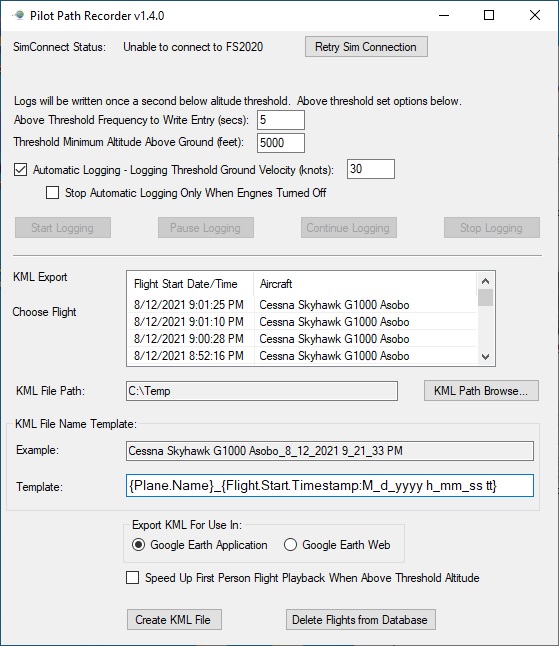
PilotPathRecorder is a replay and flight data capture tool that allows you to see your flight information visually using Google Earth. Simply use the application to log your flight and export that data to a KML file. That file can then be used with Google Earth for 3-dimensional flight analysis, flight plan information, and a chance to replay your flight from the first-person perspective. Detailed information is also available throughout your flight, such as speed, altitude, flap position, engine rpm, pitch, roll temperature, wind, flaps, lights, and much more.
This is a stand-alone application that is run outside of Microsft Flight Simulator 2020. Once run, this application allows the user to set various settings to control the recording and exporting experience. A database is used to store your flights so feel free to fly during one session and export in another.
Installation is easy. Unzip to any location you wish. Once unzipped, launch Flight Simulator and then the FS2020PlanePath.exe to start the application.
More detailed information can be found at: https://github.com/SAHorowitz/MSFS2020-PilotPathRecorder/blob/master/README.md
PilotPathRecorder
"PilotPathRecorder is a replay and flight data capture tool that visualizes your flight information using Google Earth. Log your flight, export the data to a KML file, and analyze your flight in 3D, including speed, altitude, engine data, wind, and more. This stand-alone application is easy to install and allows customization of recording settings for a detailed flight analysis experience."


User Reviews
5 reviews
Version History
- Fixed issue with waypoints causing an exception if they have a zero altitude. This would cause the SimConnect to disconnect. - Rewrote AddWaypoint algorithm to make it much simpler and easier to understand - Added logger for general exceptions that would cause SimConnect to disconnect. This will make finding future issues easier.
Log in to join the discussion
Log InComments(11)
almost 2 years ago
over 4 years ago
over 5 years ago
over 5 years ago
over 5 years ago
You find it at flightsim.to.
It is designed to import a SkyDemo KML-File to PGT, which can be used with "FS Playground" to replay your real flight.
over 5 years ago
over 5 years ago
over 5 years ago
over 5 years ago
almost 6 years ago
almost 6 years ago