
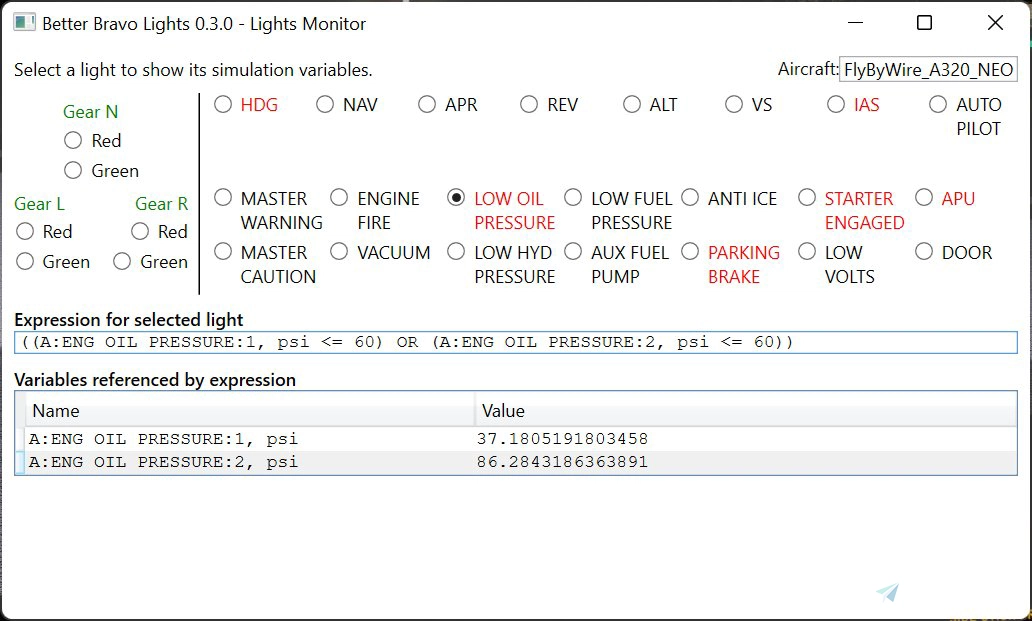
Description
What is it?
Better Bravo Lights (BBL) aims to be a ‘better’ replacement for the Aerosoft Honeycomb Bravo Throttle lights tool (aka the “AFC bridge”). It is completely standalone and does not require the original Honeycomb Bravo lights driver.
BBL provides a number of significant improvements over the original Aerosoft/Honeycomb Bravo Lights driver:
- It supports different configurations for different aircraft; this is critical because oil pressures, fuel pressures and battery voltages vary wildly from aircraft to aircraft.
- Lights respond immediately, not just after a second or two. This is vitally important for responsive autopilot buttons.
- It comes with a complete set of configurations for all of the aircraft that come with MSFS.
- It supports both A: variables and L: variables. Putting the technojargon to one side, if you want to make the MASTER WARNING and MASTER CAUTION lights work, you need a tool that can read L: variables from MSFS. AFC Bridge doesn’t support L: variables.
NOTE: THIS TOOL IS CURRENTLY IN DEVELOPMENT AND IN BETA STATUS!
If you're happy helping to test and report issues on incomplete and buggy software, give it a go. If you're not, and expect something perfect and polished, you'll want to wait a little while until it's completely stable and complete. Please don’t download it then discover it’s not complete enough for you and give it a bad rating!
InstallationDon't unpack it into your Community folder. This is a tool, not a piece of scenery.
Full details on how to install and (optionally) configure it, as well as all the source code for the tool, are available at GitHub:
https://github.com/RoystonS/BetterBravoLights/wiki
How do I report problems/make suggestions? Can I see the source code?
The full source code is available at GitHub: https://github.com/RoystonS/BetterBravoLights, where you can also raise issues, make suggestions and share useful configuration.
Frequently Asked Questions
Better Bravo Lights
Enhance your Honeycomb Bravo Throttle lights with Better Bravo Lights, a standalone tool that provides immediate and customizable light configurations for various aircraft in MSFS. Support for both A: and L: variables ensures optimal functionality for features like MASTER WARNING and MASTER CAUTION lights. Please note that the tool is currently in beta, so be prepared for potential bugs and incomplete features. Check out the GitHub link for installation instructions and to contribute to its development.


Supporters

User Reviews
44 reviews
Version History
Bug fix: * Now supports LVars with spaces in the names, which is needed for the NextGen EMB110. Thanks for the bug report, @Dimitri-dW! Features: * PMDG 737 built-in configuration: added REV light, mapping it to the VNav status. Thanks for the details, @Flintstone2k12!
Log in to join the discussion
Log InComments(260)
2 months ago
2 months ago
3 months ago
10 months ago
Installation not possible when the Community folder is located in another driver
9 months ago
You can look into my comment at https://github.com/RoystonS/BetterBravoLights/issues/79#issuecomment-3719443366 where I added a patched DLL and directions.
about 1 year ago
Easy installation, just go and fly.
Many thanks to RoystonS.
about 1 year ago
;;Fenix A320
[Aircraft.FNX_320_IAE, Aircraft.FNX_320_CFM]
Change to:
;;Fenix A321
[Aircraft.FNX_321_IAE, Aircraft.FNX_321_CFM]
Thanks for any advice!
over 1 year ago
over 1 year ago
over 1 year ago
;; PMDG 737-600
[Aircraft.PMDG 737-600, Aircraft.PMDG 737-600, Aircraft.PMDG 737-600]
HDG = L:ngx_MCP_HdgSel > 0
NAV = L:ngx_MCP_LNav > 0
APR = L:ngx_MCP_App > 0
; Thanks to @Flintstone2k12 for the REV/VNav mapping!
REV = L:ngx_MCP_VNav > 0
ALT = L:ngx_MCP_AltHold > 0
VS = L:ngx_MCP_VS > 0
IAS = L:ngx_MCP_LvlChg > 0
AUTOPILOT = L:ngx_MCP_CMDA > 0 OR L:ngx_MCP_CMDB > 0
over 1 year ago
See error log picture below
Note: I changed the paths myself, but it would be nice for simple users.
9 months ago
over 1 year ago
over 1 year ago
To get it to work in MSFS2024, you have to manually create a path to the MSFS2020 (that no longer exists for me)
%User%\AppData\Local\Packages\Microsoft.FlightSimulator_8wekyb3d8bbwe\LocalCache
and copy only the [usercfg.opt] from MSFS2024 file into it and it works.
But: This should be not necessary, the program would work just as well without this path.
Thank you
9 months ago
almost 2 years ago
Please refer: Jiangmin - RiskTool.MSIL.csem
MAny thanks, John.
almost 2 years ago
almost 2 years ago
almost 2 years ago