
Description
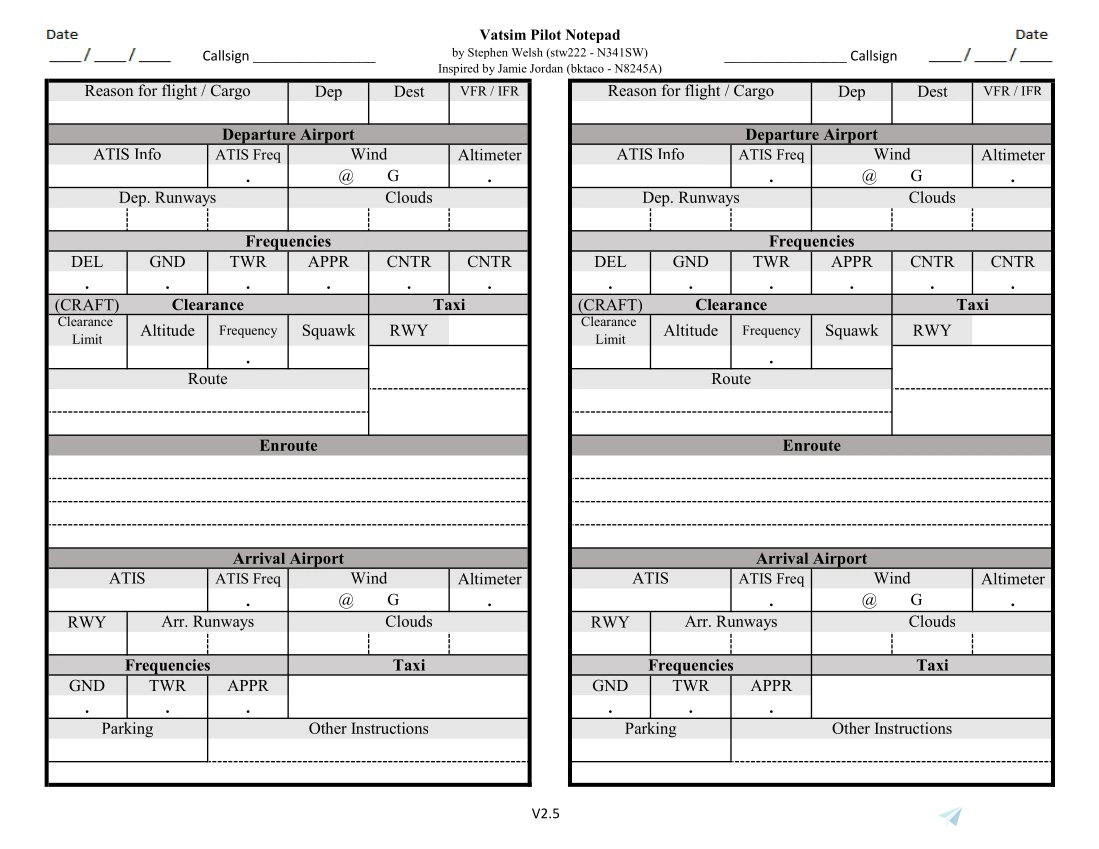
A printable form that can be used when flying on Vatsim, or any similar ATC software such as IVAO. It is filled out from the top down. It starts when you are preparing for flight, to when you taxi to parking at your destination. This design is enough for two flights per printed page.
I got the idea for this document from a very simplified version made by Jamie Jordan (bktaco - N8245A). As far as i know, he didnt publish his notepad anywhere except for a few Discord channels. But i still wanted to credit him for this idea.
How To Use:
1. Extract the .Zip file to somewhere on your computer.
2. Open and print the PDF.
3. Attatch the page to a clipboard, or use a notebook or folder, or something else so that you can write on it while communicating with Air Traffic Control
Being prepared, while you work ahead of your airplane will make you a better pilot.
This file, after it evolved a little, has kept me way more organized while flying, where I used to just scrible things down in a notebook
Vatsim Pilot Notepad
This is a printable form that can be used when flying on Vatsim, or any similar ATC software such as IVAO. It is filled out from the top down from when you are preparing for flight, to when you taxi to parking at your destination and is enough for two flights per printed page


More Information
Version History
+ Added Wind gusts * Moved around a few of the ATIS related sections so it flows better when writing the ATIS information down * Moved callsign spot to the top next to the date

Comments(1)
Log in to join the discussion
Log Inabout 3 years ago
A good idea would be to laminate the pages and use an erasable marker to fill in the various fields.
For the next flight wipe the laminated sheet clean and you're ready.
Saves on paper. Save the trees.