About this addon
Control your aircraft's autopilot systems with a push, tap and twist.
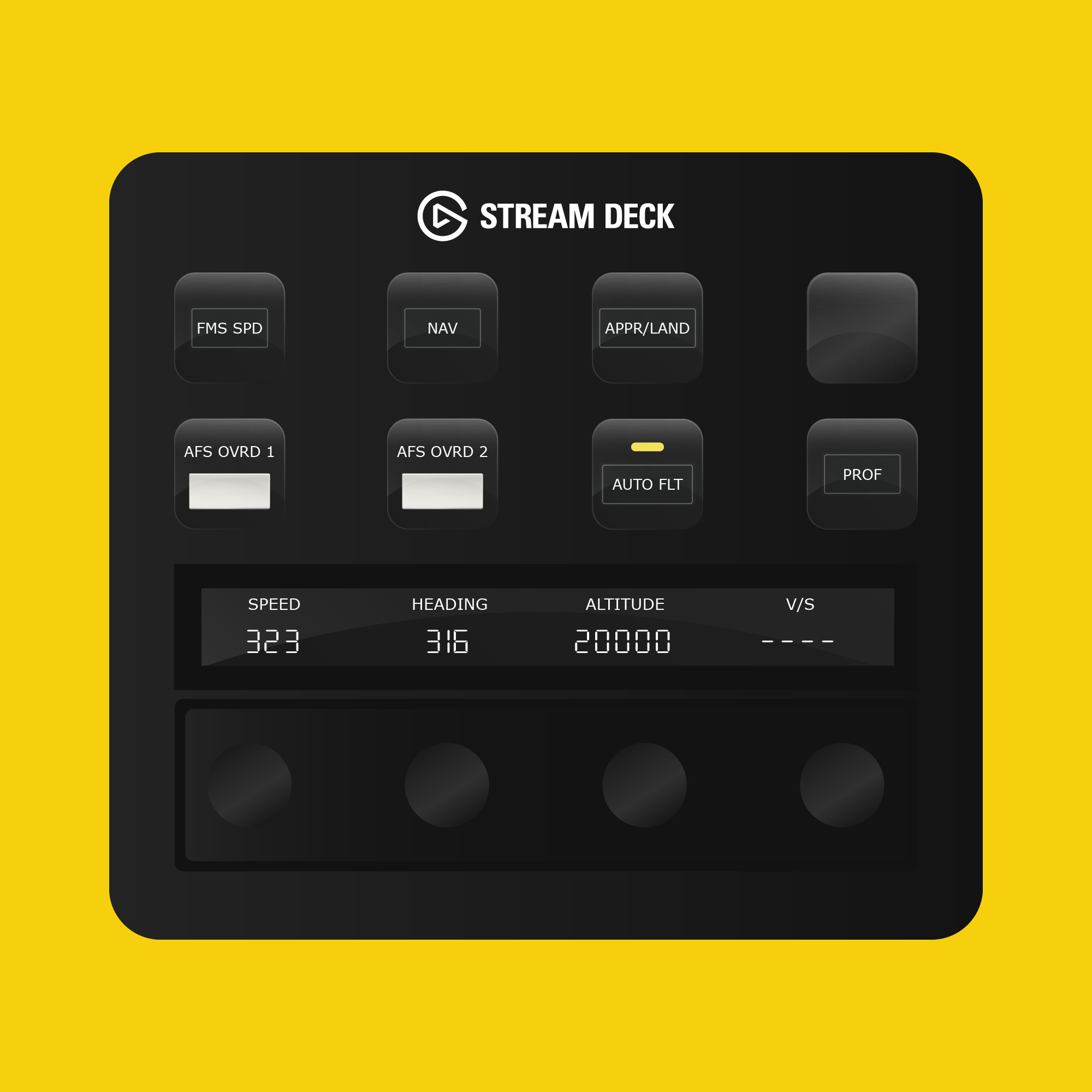
With the Flight Panels Autopilot Panel for the TFDi Design MD-11 you can manage your aircraft's autopilot systems using the physical buttons, LCD touchscreen and rotary dials on your Stream Deck Plus (+) to create a truly immersive experience.
Flight Control Panel (FCP)
Button Controls: FMS SPD, NAV, APPR/LAND, AFS OVRD 1, AFS OVRD 2, AUTO FLIGHT, PROF. Rotary Dials & LCD Screen: Real-time values for speed, heading, altitude, and vertical speed. Rotate the rotary dials left or right to increase or decrease values. Speed : Press the rotary dial to pull speed knob, or tap the LCD screen to toggle IAS/MACH; Heading: Press the rotary dial to pull heading knob, or tap the LCD screen to toggle HDG/TRK; Altitude: Press the rotary dial to pull the Altitude knob; Vertical Speed (V/S): Tap the LCD Screen to toggle V/S/FPA.
Radios & Communications
Button Controls: TRFC, DATA, WPT, VOR NDB, ARPT, MAP VOR, TCAS. Rotary Dials & LCD Screen: Real-time frequency values for COM1/COM2 (Active and Standby). Rotate rotary dials 1 and 2 to change the standby frequency for COM1 and dials 3 & 4 for COM2. Tap the screen or press a standby rotary dial to swap between Standby and Active.
EFIS & Transponder
Button Controls: PLAN, APPR, VOR 1, VOR 2, ADF 1, ADF 2, INCR, DECR. Rotary Dials: Rotate the rotary dials to increase or decrease each of the transponder digits.
Lighting
Button Controls: NAV, LOGO, BEACON, HI-INT, RWY L, RWY R, DOME, ANNUN LT. Rotary Dials: Rotate the rotary dials to increase or decrease light intensity
WX/BARO
Button Controls: NAV, LOGO, BEACON, HI-INT, RWY L, RWY R, DOME, ANNUN LT. Rotary Dials: Rotate the WX Display Brt rotary dial to increase or decrease WX display intensity; Rotate the MINS Source dial to increase/decrease minimums height, Press the rotary dial to toggle between Radio/Baro; Baro: rotate the dial to increase/decrease Baro, press the rotary knob to set STD Baro.
About Flight Panels
Our mission is to become an integral part of any Microsoft Flight Simulator setup, through the creation of professional, highly detailed, modern and consistency designed Stream Deck profiles, which maximise the immersive experience of Microsoft Flight Simulator. Our focus on user design, user experience and product research, backed by regular product updates and dedicated industry leading support - is there to provide our community with the confidence that a key part of their Flight Simulator setup will be regularly updated and supported.
Frequently Asked Questions
Q: Do you provide regular product updates?
We regularly update our Stream Deck Profiles to include new features, functionality and bug fixes and we're delighted to provide these free of cost, for the duration of the products lifespan. Announcements are also published on our Discord server and Release Notes are available on our product updates blog.
Q: What if I need support?
We provide free industry leading support by email (support[at]flightpanels.io), Discord and Live Chat (available on the bottom right hand corner of each webpage). On average, we respond to support requests in less than 15 minutes!
Q: How are your products installed?
Installation is performed through the Flight Panels All-In-One Installer, which automatically installs and configures third party applications (FSUIPC7, PilotsDeck, .NET Runtimes etc.) to make installation a breeze.
Q: How is the product licensed?
This product is for personal and home use. For commercial use and/or where used to generate revenue (directly or indirectly) a commercial license is required. Please contact support[at]flightpanels.io for further information.
Q: How can I keep up to date with the latest news?
- Blog: https://flightpanels.io/blog/news
- Product Updates: https://flightpanels.io/blog/product-updates
- Support Portal: https://support.flightpanels.io
- Instagram: https://instagram.com/flightpanels
- Threads: https://threads.net/flightpanels
- Discord: https://flightpanels.io/discord
Changelog
Release Notes: https://flightpanels.io/blogs/product-updates/code-signing-certificate-updates-2026
Release Notes: https://flightpanels.io/blogs/product-updates/multi-product-updates-march-26-1
User Reviews
No reviews yet. Be the first to share your experience!
TFDi Design MD-11 Stream Deck + Autopilot Panel
The TFDi Design MD-11 Stream Deck + Autopilot Panel provides an advanced control interface for managing autopilot systems within Microsoft Flight Simulator. Utilizing a combination of physical buttons, an LCD touchscreen, and rotary dials, users can easily adjust real-time flight parameters such as speed, heading, and altitude. The add-on also includes comprehensive radio communication controls and lighting adjustments, enhancing the overall simulation experience. Flight Panels aims to offer regular updates and dedicated support to ensure optimal functionality and user satisfaction.

Instant digital delivery • Secure payment
Requirements
Additional Requirements
- Stream Deck +
- Microsoft Flight Simulator 2020/2024 (Steam or Microsoft Store)
- The aircraft referenced in the product description
More by this publisher
AeroLens Pro Enhanced - Aerosoft CRJ 550-1000 - Stream Deck Profile
Miscellaneous
€ 27,95
PMDG 777 Stream Deck + Autopilot Panel (Black)
Miscellaneous
€ 21,25
AeroLens Pro - FlyByWire A380X - Stream Deck Profile
Miscellaneous
€ 21,25

Flight Panels All Series Bundle v3 - A32NX, A320 & 737 Stream Deck Profiles
Miscellaneous
€ 52,54
AeroLens Pro - SF50 Vision Jet G2 - Stream Deck Profile
Miscellaneous
€ 21,25
Details
- Category
- Miscellaneous
- Release Date
- Feb 4, 2026
- Last Updated
- Jun 11, 2026
- Compatibility
- MSFS2020/24