About this addon
What is REX AccuSeason?
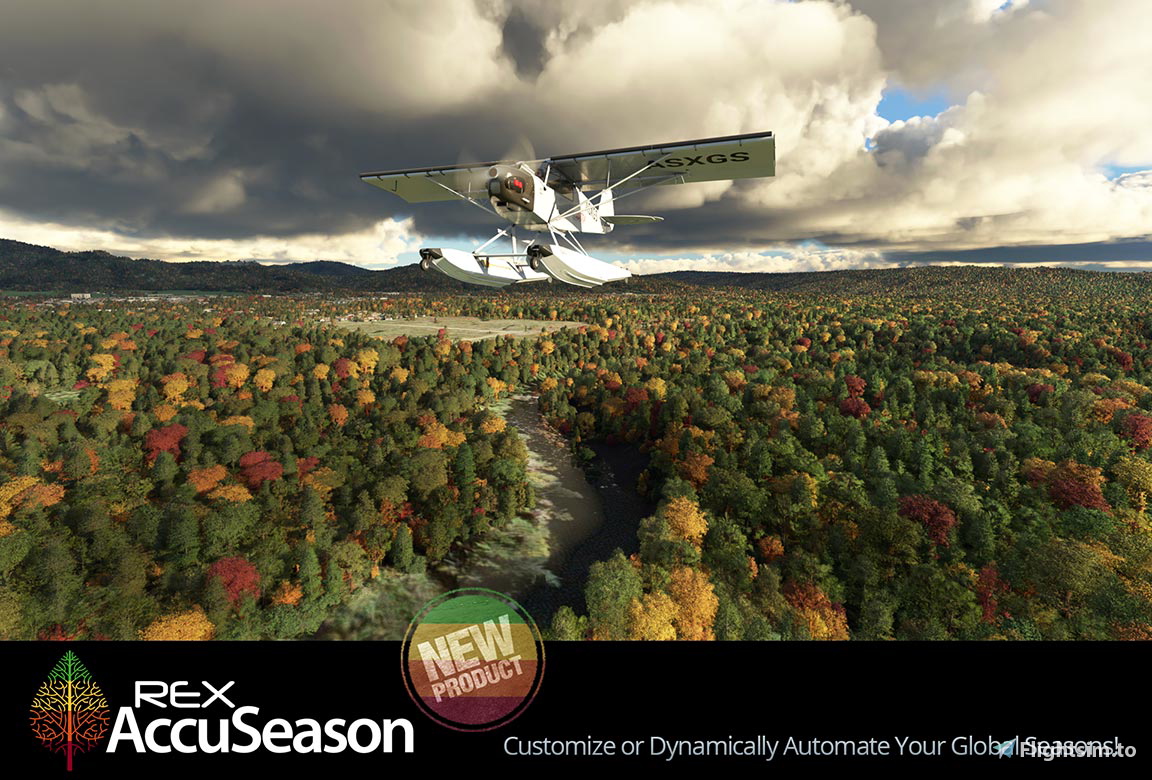
AccuSeason is a modern, feature-rich application containing a large collection of seasonal presets and vegetation configuration options that display seasons globally. In addition, you can select tree height, deciduous tree canopy type and color tone!
In AUTOMATION MODE, REX automatically displays tree colors based on current date and flight location! Our dynamic automation tech displays foliage based on current date and automatically changes tree colors throughout the year with weekly tree color changes during autumn into winter in the northern hemisphere.
Dynamic Automation
Automated Dynamic Seasons provides an accurate representation of foliage as it changes within each season throughout the year. Watch tree colors change as they progress through the season, such as weekly changes during the northern hemisphere's Autumn to Winter and bi-weekly or monthly changes during other times of the year. All automatic as the app applies foliage colors based on current date and requires no user interaction! You may also manually select any prior or future time periods. For example, if it is late Autumn and you want to fly in an early Autumn, you can select that time period and fly in early Autumn foliage.
Multiple Presets
With REX AccuSeason, you get a large amount of realistic and visually pleasing presets to use in your simulator. Every season has multiple unique presets with more to be added in future updates.
Global Seasons
Seasons are represented globally, with the season in the northern hemisphere opposite of the season in the southern hemisphere. You can fly from New York in autumn and arrive in Buenos Aires with spring vegetation. Or fly out of Sydney in Australia’s winter and arrive in Seattle with summer vegetation.
Updates to Regional Vegetation
Many areas in the world have been updated to reflect vegetation more accurately. Conifer trees have been replaced in Iceland with more applicable vegetation. A large central part of the United States has been updated to display deciduous trees rather than a large conifer forest. Palm trees have been added to many cities where before there were none.
New biomes have been created to depict steppe, tundra, Australian scrublands, New Zealand vegetation, and different conifer regions. Updating regional vegetation is a large and ongoing effort and many more improvements will be made in the future as we continue to develop further.
Winter Deciduous Trees
Microsoft Flight Simulator snow gives us attractive winter landscapes. To move to the next level, REX AccuSeason offers OUR rendition of deciduous winter trees for all areas where the simulator depicts deciduous trees, and the winter season applies. These trees show significantly less leaves and look great in winter landscapes with or without snow.
Adjust the Tree Height
To further customize your experience, REX AccuSeason offers three options for tree height: short, medium, and tall. Additionally, some trees have been properly sized in the app to reflect more realistic proportions, such as the massively sized default trees that display in Sydney, Australia.
Select the Deciduous Tree Canopy
An irregular-shaped canopy for deciduous trees is available in addition to the default shape (which is predominantly a rounded canopy). The irregular-shaped canopy makes a nice difference, as deciduous trees with irregular canopies look more varied in shape. The color within the tree often has more color variation, and colors in general appear deeper and richer.
Select Your Choice of Vegetation’s Overall Color Tone
REX AccuSeason lets you select the overall color tone that looks best to you with a choice of three-color tones: cool, warm and neutral.
Manage Your Seasons and Customization with a Modern App!
With all the vegetation options provided, the app allows you to choose your selections quickly and easily. No need to manually work within Windows folder structures to change files or edit text documents. Simply select preset and customization choices within the app and it will do all the work for you. As future enhancements are developed, updates will occur automatically, so no need for frequent downloading and manipulating files.
Changelog
FIXED - Preset navigation and installation process.
ADDED – New spring presets Beginnings and Renewal. ADDED - Updated all presets with latest improvements to support Microsoft Flight Simulator Sim Update 12. FIXED – August automated and manual presets not being installed properly.
ADDED - New spring preset named Bloom containing floral trees in many areas. ADDED - Weekly vegetation for July to Automated Dynamic Seasons containing expanded vegetation color changes. ADDED - New content for Enhancements; Northeast Australia Coastal Region.
User Reviews

WartedSummer2
VerifiedAug 15, 2024
I have been using AccuSeason for almost two years and have never had any issues with it. There were some documented hiccups with the release of Accuseason Advanced, but fortunately I didn't have any issues with it. Setup is easy, and most of the concerns with licensing, installation are no longer relevant with the most recent releases.

Archer374
VerifiedOct 22, 2023
I can't confirm Dougiesy's problem with the update. I received the relevant information and Accuseason Advanced works like a charm. No need for a trash rating.
Dougiesy
VerifiedSep 22, 2023
They said to download a newer version. I did it but in order to install it they ask for an order number of which there is none. Customer service is a joke. No way to really contact them like most online BS companies. Fed up with their BS tactics

You should find the order referance on the email sent when you bought it

The same thing happened to me, I have no order number. I bought the product on April 9, 2022. If it doesn’t come out I won’t buy it on this site anymore.
Did you ever find a solution to this problem ? If so please let us know
Not sure if you are still dealing with this issue or not. I found a solution that worked for me as I had the same issue. I simply just copied my license key into both order # and the other section (cant remember if what it was called). Then filled the rest of my info in as normal.
Ho scritto al support che mi ha inviato una chiave
Gaudeamus
VerifiedNov 5, 2022
Danke für ihre Arbeit: REX generiert in den grossen Alpäntäler (Südtirol, Rheintal, Wallis, Engadin aber auch in Östereich etc,) reine Nadelwälder. Die Originaltexturen sind da realistischer und besser. Da gibt es für Rex noch einiges zu optimieren. Thanks for your work: REX generates pure coniferous forests in the large Alpine valleys (South Tyrol, Rhine Valley, Wallis Engadin but also in Austria etc.). The original textures are more realistic and better. There is still a lot to optimize for Rex.
REX AccuSeason
What is REX AccuSeason? AccuSeason is a modern, feature-rich application containing a large collection of seasonal presets and vegetation configuration options that display seasons globally. In addit

Instant digital delivery • Secure payment
Requirements
Additional Requirements
Minimum System Requirements
- Flight Simulator:
Microsoft Flight Simulator - Windows Operating System:
Windows 10, Windows 11 - RAM Memory:
16GB or higher - Hard Drive Space:
10GB - Graphics:
NVIDIA GTX 770 | AMD Radeon RX 570 - Internet Connection:
Required for installation, registration, and operation
More by this publisher



Details
- Category
- Utilities
- Release Date
- Apr 9, 2022
- Last Updated
- Mar 31, 2023
- Reviews
- 4
- Compatibility
- MSFS2020