About this addon
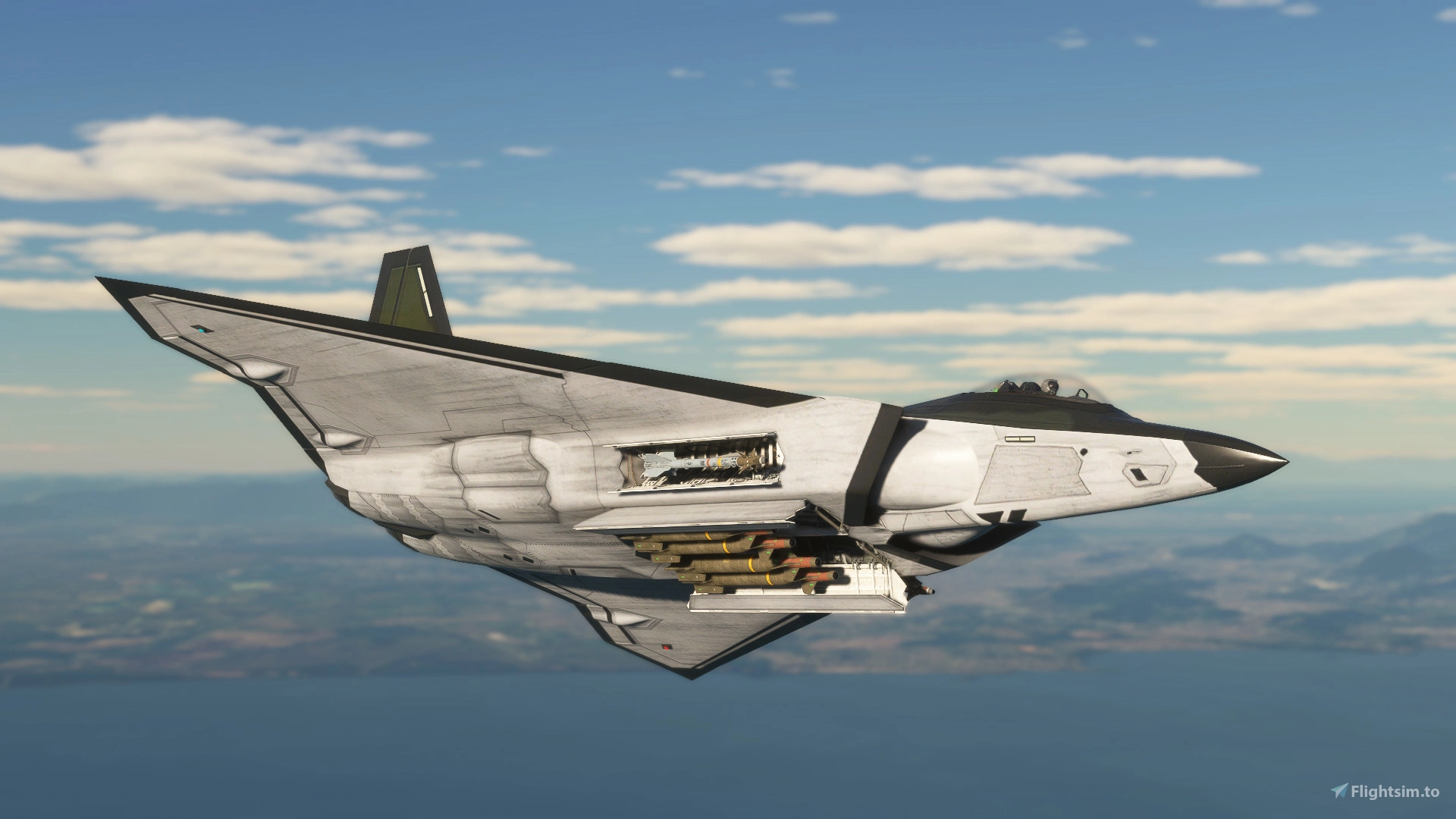
It's time to fly the FB-22 Strike Raptor in Microsoft Flight Simulator! Discover what could have been an iconic stealth fighter-bomber operated by the United States of America, which could have entered service in the 2010s. The aircraft is based on a study model, and its real-life version never went beyond the design phase. The aircraft you will fly is based on the FB-22-2 variant, with a delta wing and a single-pilot seat. There are 15 liveries available, including the celebrated VX-4 Evaluators, as well as SEA camouflage versions and the 66th Aggressor Squadron's multicolor livery. The flight model is intuitive and easy to use, and the cockpit is highly detailed, with its own customized flight systems allowing GPU interaction, Cold & Dark start, and bomb bay opening. You will have AIM-9 and AIM-120 missiles, as well as two types of JDAMs, all aesthetically pleasing, to carry during your flights. Enjoy!
Upon starting on the runway, your aircraft will be ready for flight. When starting from the apron with the engine Cold & Dark, consider pressing the ENGINE START button on the left MFD screen in front of you. Wait 1 minute for both engines to fully start and monitor the EICAS on the MFD itself as engine RPM and temperature increase to the ideal level. Meanwhile, you can experiment with the chocks or the GPU display. The takeoff run should be smooth, and the aircraft will take off without difficulty using the electronic flight management system.
Using the autopilot is simple, but requires prior guidance: you must click on the desired function before you start typing. Use the ENT buttons to confirm what you have typed or CLR to delete and type again. It is always necessary to click on the desired function before typing. Consider starting to configure the autopilot by selecting the altitude; therefore, first press the ALT button and then enter the desired value. Press ENT if the final value has fewer than 4 digits. Above 5 digits, the value is automatically applied by the autopilot. Next, set the desired speed or heading, or even the GPS navigation mode. If you want to remove speed control, click the A/T button. Consider using the VS+ and VS- buttons to interact with the climb mode.
IMPORTANT: Avoid using Mach control during climbs to prevent constant acceleration and deceleration. During the climb phase, if you wish to use automatic airspeed control (A/T), use normal airspeed control in knots, and after stabilizing your altitude, switch to Mach control if desired.
The flight model anticipates that above 300 knots the air brake will be automatically activated if the throttle is at zero, to facilitate speed reduction at critical moments. The air brake will also be automatically activated during landing if the parking brake is engaged at touchdown. It is still possible to manually engage it at any stage of flight, but in any of the above conditions, its activation and retraction will be automatic.
FAQ: https://www.roprodaudiovisual.com/fb-22
Changelog
- Pilot and modified suit - Cockpit texture correction
User Reviews

ishkillerjp91
VerifiedSep 30, 2026
no why why
tobz
VerifiedMay 1, 2026
too expensive for what you get. cons 1 needs more functioning buttons/controls. 2 airbrake needs fixing, needs to work at all times. 3 canopy needs fixing . likes 1 weapons arrey and being switchable . 2 love the look wish you would make a complete badgeLESS in black please I dont regret buying it,I like mine. more 3.8 than just 3
babolet
VerifiedJan 29, 2026
Amateur work at a professional price. Nothing in the cockpit is clickable, so you can't even perform a very simple engine start procedure. The modeling isn't too bad, but the colors are incomplete. The flight envelope is strange. The roll cough is very slow. Very disappointed.

Thank you for your comment, but your statement is completely false. The cockpit has several clickable buttons, all the buttons on the alphanumeric keypad are clickable, as well as the other buttons on the AP panel and screens, and there are buttons and instructions on the website mentioned in the product description for performing Cold & Dark starts. There are 15 paint schemes available, it is entirely possible to taxi and perform any procedure on the ground. Your comment is strange and does not reflect the product.
FB-22 Strike Raptor
Experience the FB-22 Strike Raptor, a stealth fighter-bomber designed for the Microsoft Flight Simulator, reflecting a concept from the United States military. This add-on features the FB-22-2 variant with a delta wing and includes 15 diverse liveries. The detailed cockpit offers advanced flight systems, intuitive handling, and the ability to carry AIM-9, AIM-120 missiles, and JDAMs. Users can enjoy a realistic flight experience with an easy-to-use autopilot and automated features for enhanced usability during flight.
Instant digital delivery • Secure payment
Requirements
Additional Requirements
- Windows PC. This product is not supported on Xbox.
- Operating System: Windows 10 with the latest update
- DirectX: Version 12
- Processor (CPU): AMD Ryzen 5 2600X or Intel Core i7-6800K
- Video Card (GPU): AMD Radeon RX 5700 or NVIDIA GeForce GTX 970, both with at least 4 GB of VRAM
- RAM memory: 16 GB
- Storage: 50 GB of available space
- Internet Connection: Minimum bandwidth of 10 Mbps
More by this publisher

Details
- Category
- Aircraft
- Release Date
- Jan 19, 2026
- Last Updated
- Jan 28, 2026
- Reviews
- 3
- Compatibility
- MSFS2020/24