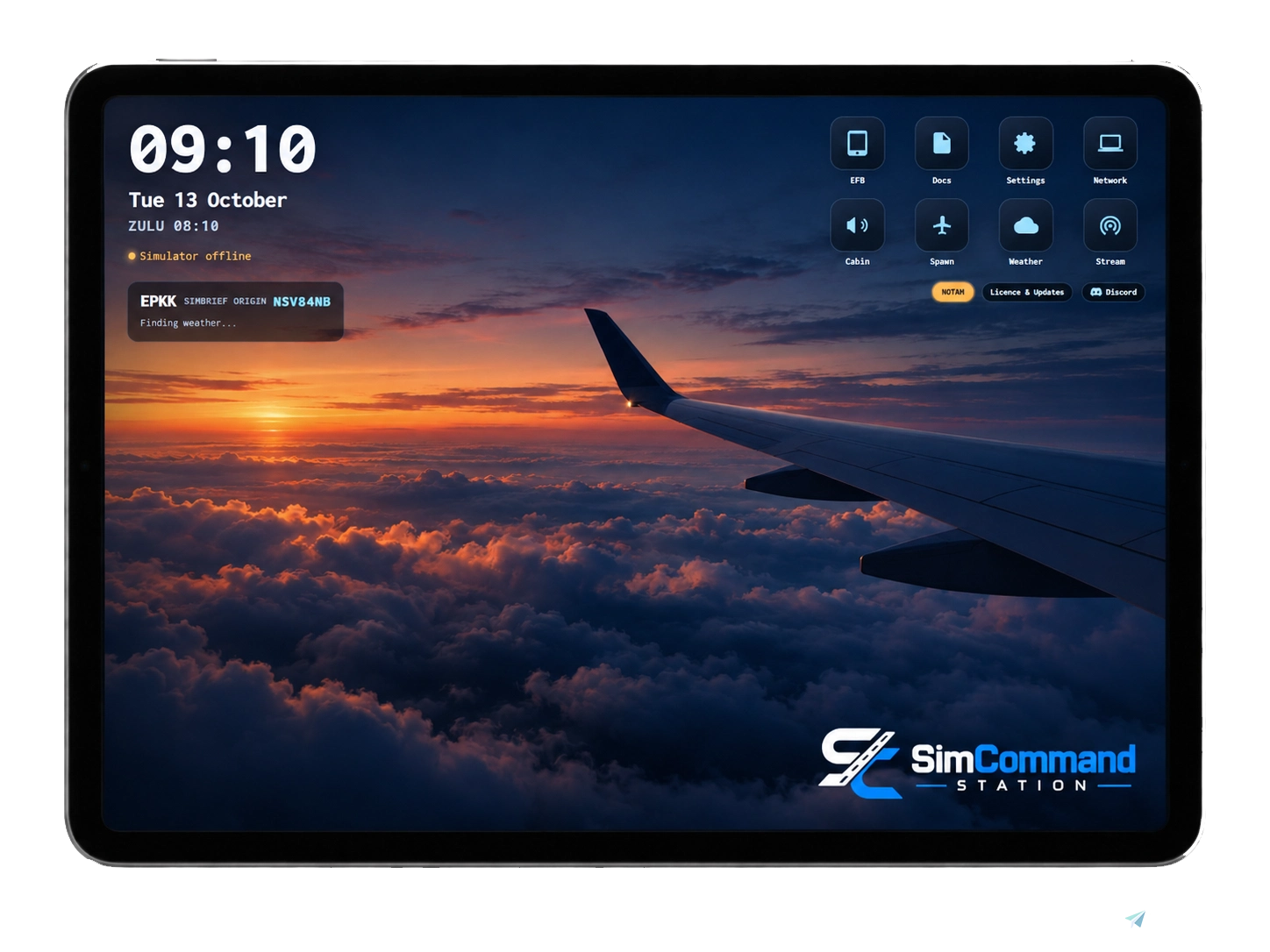
About this addon
This is home licenced application. For commercial licence please visit out website.
Spend less time setting up and more time flying.
SimCommand Station started as a simple utility for repositioning aircraft and monitoring simulator data, but has grown into a complete flight simulation companion for Microsoft Flight Simulator 2020, 2024 and X-Plane 12.
Connect your simulator, import your latest SimBrief OFP and manage your flight from one clean interface. From pre-flight preparation through to touchdown, SimCommand Station brings together many of the tools normally spread across multiple applications.
Main Features
- SimBrief integration – import your latest flight plan and OFP
- Aircraft positioning – spawn on final approach, runway, gate or a custom map position
- Fuel, payload & weight and balance management
- Takeoff performance calculations
- Landing performance calculations
- Live weather – METAR, TAF, runway winds and crosswind information
- Interactive moving map with aircraft tracking and multiple map styles
- Live traffic radar with VATSIM and IVAO traffic
- VATSIM & IVAO integration – pilots, ATC, frequencies and ATIS information
- SayIntentions.AI integration – live AI ATC transcript, frequency board and quick ATC requests
- Live COM1 / COM2 & transponder monitoring
- Flight navigation & waypoint tracking
- Approach monitoring & touchdown statistics
- Custom checklists & flight briefings
- Voice announcements with automatic flight-phase triggers
- Custom announcements
- Digital notes / scratchpad
- Web EFB – add Navigraph, aircraft EFBs or other web-based tools
- Simulator time controls
- Flight statistics
- PC shortcuts – launch simulator tools and applications directly from SimCommand Station
- Plus additional simulator tools and utilities
Supported Aircraft
SimCommand Station includes dedicated performance, fuel, payload and weight & balance data for a growing range of aircraft.
Airliners / Jets
- Boeing 737-700, 737-800 and 737 MAX 8
- Boeing 767-300ER, 777-300ER, 747-8 and 787-9
- Airbus A319, A320, A320neo, A321, A330-300, A340-300, A350-900 and A380
- Embraer E175 and E190
- CRJ900
- McDonnell Douglas MD-11 and DC-10-30
- Fokker 100
- BAe 146 / Avro RJ
Regional / Turboprop
- ATR 72
- Dash 8 Q400
General Aviation
- Cessna 152
- Cessna 172
- Cessna Citation X
- Piper Tomahawk
- Piper Cherokee / Warrior
- Diamond DA40
Enhanced Payload Profiles
The Boeing 737 MAX 8, Boeing 737-700, Airbus A320neo and Airbus A380 include custom passenger seat-station layouts for more accurate per-seat payload and weight distribution.
Other Aircraft
Aircraft not currently listed are still supported. SimCommand Station automatically applies a suitable generic performance and payload profile based on aircraft weight class:
Piston · Light · Medium · Heavy
This means you can continue using SimCommand Station with virtually any aircraft while dedicated aircraft profiles continue to be expanded.
And that is only part of it — SimCommand Station contains too many features to list them all, with new tools and improvements continuing to be added.
Whether you're flying from a desktop setup, home cockpit or full-scale simulator, SimCommand Station gives you one central station for your entire simulation workflow.
Changelog
SimCommand Station v2.2.3 – Changelog What's new since version 2.2.0 New Features Custom Port - Specify custom port for the app. Use only if really necessary. Pushback (Home > Pushback) - New pushback system for MSFS and X-Plane, controlled directly from your tablet without the default simulator tug. - Simple Mode: Push straight back, turn tail left or right, or continue straight with adjustable distance and turn settings. - Map Mode: Select your desired pushback position directly on the airport map, with a visual pushback route and warnings for turns that are too tight. - Pushback starts when the parking brake is released and stops when it is applied. - Ground crew voice communication using Windows speech or custom audio recordings. - Support for two audio output devices simultaneously, with automatic coordination to avoid interrupting cabin announcements. - More realistic disconnect sequence with a 10-second delay between towbar disconnection and bypass pin removal. SimBrief Flight Planning (Home > SimBrief) - Plan your next flight directly from the tablet. - Enter airline, flight number, departure and destination, aircraft, registration, cruise level, departure time and route. - Automatically pre-fills details from your previous OFP. - Generate a flight plan directly through SimBrief without requiring an API key. - Support for custom SimBrief airframes. - New Flight option to start with a blank flight plan. - Return Leg option to automatically prepare the return journey. - Import your generated OFP and prefile your flight with VATSIM or IVAO. vPilot Messaging (Comms > TEXT) - Receive and reply to vPilot messages directly from your EFB. - Support for private, frequency, broadcast and SELCAL messages. - Messages containing your callsign are highlighted with an audible notification. - New ATC selection menu showing nearby, departure, arrival and en-route controllers. - Install, update or remove the integration from Settings > Integrations without restarting vPilot. Improvements Radar & Maps - Improved airport runway rendering with accurate runway width, centrelines, thresholds, piano keys and runway numbers. - Fixed duplicate runway rendering and missing threshold markings at Dublin and other affected airports. - ATC coverage areas now fade automatically when zooming into airports, improving visibility of taxiways and stands. - Reduced FIR overlay opacity for better map readability. - Fixed aircraft selection within approach coverage areas. - Improved Layers and Weather menus, which now open beside their buttons and scroll correctly on smaller screens. Weight & Balance - New aircraft loading options: Instant, 15 Minutes or Realistic. - Loading continues in the background even when the tablet goes to sleep. - Manual loading now handles passengers and cargo separately. Landing Performance - New warnings when exceeding maximum landing weight, including estimated fuel burn required. - Warnings when exceeding the runway's TLR limit. - Corrected maximum landing weights for the Q400, BAe 146/RJ and Citation X. - Improved Max LDW display for better readability. Operational Flight Plan (OFP) - Added PIC and dispatcher name fields. - New handwritten signature feature. - Signatures are added directly to the appropriate SimBrief OFP fields. - New flight plans automatically start unsigned. Flight Log - Off-block and takeoff times now use actual recorded NAV times. - Displays the difference between planned and actual departure times. - New delay reporting with support for multiple IATA delay codes. - Delay information is saved with flight logs and included in CSV exports. Comms & ACARS - Improved ACARS session management across multiple connected devices. - Prevents additional devices from connecting under a different callsign. - Unread message notifications now synchronise correctly across all devices. - Updated Comms interface with improved button layout and a dedicated search row. Home Screen & General - Added Full Screen button beside Discord on PC and Android. - Dashboard METAR now displays destination weather when airborne instead of selecting nearby airfields. - Reorganised home screen tiles to accommodate SimBrief and Pushback. - Improved FLIGHT tab layout on smaller tablets. - Added configurable station port in Settings. - Improved PC application closing functionality, supporting file names, application names and window titles. - Improved home screen icons when installing the EFB as a shortcut on tablets. Fixes Checklists - Boeing 737 MAX After Takeoff checklist corrected to show Landing Gear UP, as the MAX does not have an OFF position.
Version 2.2.0 brings a major expansion to SimCommand Station, including a completely redesigned Home screen, advanced weather controls, VATSIM text messaging, a rebuilt radar map and numerous improvements across the entire application. ## NEW FEATURES **NEW HOME SCREEN** - Completely redesigned Home screen with local clock, date and Zulu time. - Quick access to EFB, Docs, Settings, Network, Weather, Spawn, Cabin and Stream. - Smart weather card automatically displaying conditions at your parked airport, SimBrief origin or destination when airborne. - Custom wallpaper for each connected device. - Optional automatic return to Home after inactivity. - New SimCommand NOTAM notification system with acknowledgement. - Licence status and Discord shortcut. **ADVANCED WEATHER CONTROLS** - Active Sky integration supporting Live, Historic and Custom weather. - Set custom METAR conditions at an airport using Active Sky. - Display turbulence and wind shear effects at the aircraft. - X-Plane 12 real weather toggle and 9 weather presets. - Full X-Plane 12 weather control including wind, visibility, QNH, temperature, rain, turbulence, runway conditions and three cloud layers. - New SimCommand weather package for selecting MSFS weather presets without Active Sky. - Install the MSFS weather package from Settings > Integrations. - New simulator time and date controls for MSFS and X-Plane. - Time presets, exact time, date selection, season shortcuts and real-time synchronisation. - Real-time indicator turns green when simulator time matches real time. **VPILOT / VATSIM TEXT MESSAGING** - New vPilot integration available under Comms > TEXT. - Read private, frequency, broadcast and SELCAL messages directly from your EFB. - Reply privately or send messages on the active frequency. - Callsign mentions are highlighted with an audible notification. - ATC picker with Nearby, Departure, Arrival and On Route categories. - Install the vPilot plugin from Settings > Integrations. **WEIGHT UNITS – KG / LBS** - Switch between kilograms and pounds throughout the application. - Applies to Weight & Balance, fuel, OFP, performance and logbook. - Display-only conversion; values sent to the simulator remain unchanged. **RADAR MAP – NEW FEATURES** - New GPU-accelerated map engine for smoother performance. - New Chart basemap with airport taxiways, aprons and terminals. - 3D terrain support. - Gate and stand information for over 1,550 airports. - Departure, arrival and alternate airport stands automatically preloaded. - New VOR layer with frequencies, DME channels and additional information. - Low and High airway layers with minimum levels. - Enroute fixes using simulator navigation data. - Animated weather radar showing precipitation movement. **NEW KNEEBOARD NOTES** - New aviation-style kneeboard forms. - Separate Departure and Arrival ATIS sheets. - Clearance, Taxi and Approach forms. - Blank squared notes page. - Automatically remembers the last selected page. **FLIGHT LOG ENHANCEMENTS** - Actual off-block and takeoff times with early/late comparison against the flight plan. - New Add Delays feature using standard aviation delay codes. - Distribute delay minutes across multiple codes. - Delay information included in saved flights and CSV exports. - Saving a flight log automatically clears the same flight form on other connected devices. **FUEL, PAYLOAD & OFP** - New FINRES + ALT fuel figure. - Warning when the SimBrief aircraft differs from the aircraft loaded in the simulator. - Performance calculations now use the aircraft actually loaded. - Flight date displayed in the OFP header. **STREAM OVERLAYS** - New OBS Route Card overlay alongside the existing Flight Progress overlay. - Custom background colours and transparent background support. - Live previews for both overlays. **PC & NETWORK CONTROLS** - Launch PC applications with custom command-line arguments, such as vPilot -host. - Close applications using file name, Task Manager process name or window title. **SIMBRIEF ACCOUNT MANAGEMENT** - New SimBrief alias popup with a direct link to the SimBrief account page. ## IMPROVEMENTS **RADAR** - Completely rebuilt map rendering engine for smoother performance with large traffic volumes. - Faster loading of airport gates and stands. - Improved ATC coverage transparency. - ATC coverage automatically fades when zooming into airports. **COMMS & ATC** - Improved enroute ATC detection on short flights and between waypoints. - ACARS now uses one shared session across the entire station. - ACARS notification badges clear across connected devices. - New pill-style source selector. - Filters and search moved to a dedicated row. - Full-height message lists for easier reading. **FLIGHT OPERATIONS** - Improved flight log synchronisation across devices. - Performance calculations now use the aircraft loaded in the simulator rather than the SimBrief aircraft. **SETTINGS & INTERFACE** - Settings reorganised into clearer sections with shorter labels. - Improved number keypad behaviour: entering a new value now replaces the previous value instead of appending to it. ## FIXES - Fixed missing enroute controllers on certain routes, including short flights such as EGNT–EGPH. - Fixed aircraft inside radar approach zones not being selectable. - Fixed FIR labels not being correctly centred. - Fixed approach labels overlapping airport locations. - Fixed the header shadow introduced by the recent iOS/iPadOS update. --- Thank you for your continued support and feedback! **SimCommand Station – Your flight. Your cockpit. Your command.**
**FlyByWire A320neo and A380X — fuel and payload now load** Both aircraft manage their own loading internally and ignored anything sent from outside, so "Load to Aircraft" appeared to do nothing. Fuel and payload now load correctly on both, straight from your SimBrief plan. **Automatic aircraft detection** The app now recognises which aircraft you have loaded in MSFS and selects the matching profile by itself — FlyByWire, iFly and Fenix are recognised, including airline liveries. An aircraft it doesn't recognise falls back to your flight plan, then to Default, and you can still pick manually at any time. **Aircraft list** The profile actually in use is now highlighted, however it was chosen. The list is sorted by aircraft name, so each manufacturer's aircraft group together. **Fixed** - A380 was loaded roughly 10 tonnes over plan — passengers were counted twice, once in the cabin and again in the holds - Weight & balance plotted the aircraft in the wrong place on the envelope for FlyByWire aircraft; it now uses the aircraft's own centre of gravity figure - Takeoff time could be recorded during taxi and then couldn't be corrected. It now requires sustained flight above 40 kt - SimBrief plans larger than 100 kB silently failed to save. The import reported success while the app stayed on the previous flight — the cause of stale takeoff times and auto-detect not re-arming - Landing runway ignored the planned runway and could pick its reciprocal, so crosswind was calculated against a runway facing the opposite way - B737 payload profile used the wrong units, putting 85% of the load in the holds **Also** - Chronograph keeps its time per device across refreshes - Target runway is remembered and applied from the plan, with a manual pick taking precedence - Aircraft profiles show which add-on they were verified against - Network tab rebuilt with Launch/Close columns and Power in the header - Renamed: Voice → Cabin, PC → Network, "This PC" → Master - New traffic-pattern spawn picker with clickable positions - Weight & balance chart now fits a tablet screen > **A380 note:** if your SimBrief airframe's empty weight doesn't match the > FlyByWire A380X (300,007 kg), planned and actual weights won't agree and block > fuel will be under-planned. Worth checking your airframe profile. **Weather** - QNH and visibility are shown in the units the reporting station actually publishes — hPa or inHg, metres or statute miles — instead of being converted to one style. A UK field reporting 9999 no longer appears as "10 sm" - All three of your plan's airports refresh in the background every 10 minutes, whether or not the Weather tab is open, and are loaded as soon as you import a plan - A failed fetch no longer wipes good weather off the screen - Clearer "Fetching weather…" state and a longer timeout for slow sources **Navigation** - A new plan is recognised reliably, so only a genuine re-import keeps your recorded times - Off blocks can fill itself in automatically, triggered by the aircraft first moving rather than by engine start **Other** - Cruise announcement needed only three seconds of level flight to trigger — now three minutes - Fuel reserves breakdown: taxi, trip, final reserve, alternate, extra and block total - Licence and update buttons combined into one - Portrait layout fixes across Takeoff, Landing, Comms, Notes, Calculator and Spawn **Navigation** - Importing a new flight plan now clears the previous flight's recorded times - A schedule difference beyond 12 hours reads "Not from this plan" rather than a meaningless number **Times** - Everything flight-facing is now Zulu, so the station PC and a tablet elsewhere always agree **GSX** - Connects reliably when the app starts before the sim, recovers from a Couatl engine restart, and retries faster **Weather** - METAR results cached for five minutes, with Refresh bypassing the cache - The panel now refreshes when opened rather than showing whatever it had at startup **Radar** - Aircraft icons render consistently and have their drop shadow back, with larger tap targets - Runway compass pairs runway ends correctly — 487 airports previously drew one runway as two, and parallel runways now both show - Switching ATC airspace on no longer tints every aircraft **Layout** - Weather and Voice panel overlap fixed on tablet widths
**27.09.2026** ### Radar - Real Approach Airspace - Approach and departure sectors are now drawn as their **actual published shapes** rather than range circles. Press a sector to view its frequency, controller and ATIS. - IVAO now uses the same sector shapes, and IVAO **centre controllers** display their real FIR polygon. Previously, most appeared as just a dot. - Approach positions whose facility isn't in the dataset now fall back to a dashed **37 nm estimate**, the median size of a real approach sector, instead of the controller's declared radar range, which is commonly left at the 150 nm default. - Airport markers now show staffed positions beneath the airport code: **A** ATIS, **D** Delivery, **G** Ground and **T** Tower. ### Radar - Everything Else - Rebuilt aircraft popup showing route, pilot, aircraft type, filed vs actual level and speed, squawk, and the aircraft's flight path directly on the map. - New airport and ATC popups showing frequency, controller, airport name and real ATIS. - Aircraft are now drawn as plane silhouettes on a single shared canvas instead of approximately 2,400 individual map markers, making Radar significantly smoother to pan and zoom and aircraft easier to select. - Radar now loads in the background from app startup instead of waiting until the Radar tab is first opened. - Traffic is briefly cached on the server, allowing additional devices opening Radar to receive traffic data much faster. - Added a **Refresh** button directly to the map. ### ACARS / CPDLC - New **Initial Report** button automatically builds an initial contact message using your live altitude and speed. The message is loaded into the send box so it can be edited before transmission. - **HANDOVER** and **NEXT DATA AUTHORITY** messages now provide a one-press **Logon to XXXX** option for the next controller, together with Dismiss. - Station name handling has been corrected and longer sector callsigns are no longer cut short. - Alert sounds now have three options: **OFF / THIS DEVICE / MASTER**. MASTER plays the alert through the station PC, useful when a tablet cannot be heard over the simulator. - A flashing indicator now appears in the top bar when an ACARS message arrives while you're using another tab. Opening ACARS clears the indicator. - Fixed the message chime sounding on every browser refresh or playing twice. - Fixed filed flight levels being interpreted incorrectly, including FL360 appearing as 360 ft and F3000 as 300,000 ft. - Fixed altitudes such as 9,960 ft incorrectly displaying as FL100. ### Faster Connections - One live connection now carries NAV, Checklists, Voice, ACARS and SimBrief instead of eight separate connections, reducing browser connection usage. - Improved startup order: **SimBrief first, then Comms / NAV / Voice, with Radar last.** - Much less waiting when the simulator isn't running. Requests that previously waited for their full timeout now fail quickly and retry. ### Comms - **ALL** is now the default view alongside DEP and DEST. Selecting an airport narrows the display to that airport plus enroute positions. - The airport box is no longer pre-filled. - Larger text added to the network selector. ### Weather & Settings - **SayIntentionsAI** added as a weather source. During a SayIntentions flight, this displays the weather actually injected into the simulator and used by its ATC. - Settings have been reorganised. **Integrations** now contains SimBrief and all API keys, moved out of Network. - Fixed buttons overflowing their settings blocks. ### Notes - Added **Clear All** to wipe every notes page at the start of a new flight. - Drawing with a finger no longer highlights the page instead of writing. ### GSX - Status readouts have been moved onto the title row as compact pills. - The GSX menu has been tightened so a full menu can fit on screen. ### OFP - The flight plan document now uses a **dark appearance** matching SimCommand Station instead of displaying as a white page. ### Other Improvements - Checklist section headings are now displayed in capitals. - NAV and Schedule timing colours improved: green is only shown when you have time in hand, while late timings progress from orange to red. - Menu categories are easier to scan, with the active item shifting to the right for clearer identification. - Consistent faded placeholder text throughout the application.
Changelog 2.0.7 → 2.0.8 New Log tab - new flight logbook panel. Docs tab - new documents panel. WXR: Custom METAR moved to a popup - no longer sits at the bottom of the Weather tab forcing it to scroll; now opens via a "Custom" button next to Departure/Destination/Alternate. Fixed Sluggish UI when the sim isn't connected Map follow and checklist reset behaviour UI/UX Proper internal scrolling throughout the app — the whole page no longer scrolls as one block; each panel (checklists, nav tabs, etc.) scrolls independently with thin, low-contrast scrollbars, and checklist scroll position is now remembered per checklist. Start-up launcher window: removed the redundant "On this PC" row (kept "Connect at:" LAN URL) Minor tweaks across Checks, Stream, Voice, Radar, and the stream overlay.
User Reviews
No reviews yet. Be the first to share your experience!
SimCommand Station
SimCommand Station is a companion utility for Microsoft Flight Simulator 2020 and 2024 that centralizes aircraft positioning, landing analysis, and simulator controls. Users can quickly reposition aircraft, analyze landing details, and adjust fuel and payload through an intuitive interface. The tool includes an interactive live map, METAR lookup, time and weather controls, and various camera options. Compatible with PC, tablet, and phone, it streamlines both training and simulator management tasks.

Instant digital delivery • Secure payment
Requirements
Additional Requirements
- Windows PC • MSFS 2020 or MSFS 2024 • Internet connection
- Microsoft Flight Simulator must be running to use simulator-control features.
- Gate and parking positions are obtained from installed MSFS scenery and may vary with custom or modified airports.
Details
- Category
- Utilities
- Release Date
- Aug 30, 2026
- Last Updated
- Oct 30, 2026
- Compatibility
- MSFS2020/24
- Country
- United Kingdom