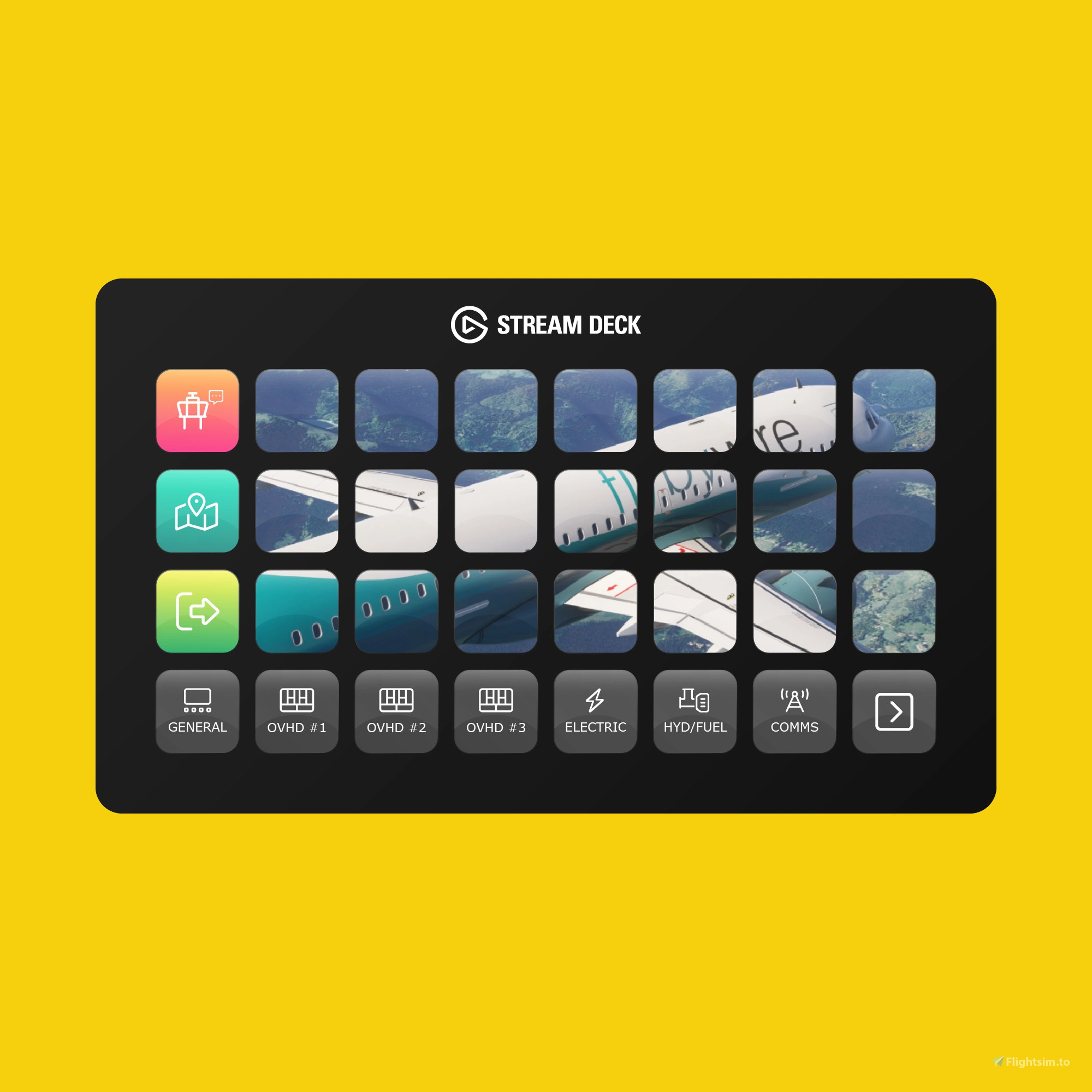
About this addon
FlyByWire A32NX Stream Deck Profile
Introducing the FlyByWire A32NX (2026 Edition) Stream Deck Profile for Microsoft Flight Simulator 2020/2024, featuring 650+ custom designed and pre-programmed buttons across 26 pages, that match the unique look and feel of the aircraft.
Incorporating the latest features, functionality, design and technical methodologies, the FlyByWire A32NX (2026 Edition) provides an unparalleled level of detail that allows pilots to command the flight deck, whilst creating an extraordinary level of realism and immersion.
Beyond cockpit buttons, toggles and switches, the FlyByWire A32NX profile offers a wide range of additional features including ground services, aircraft performance metrics, ATIS information, cockpit feature controls and much more.
Available Product Versions
This product includes both 32 and 15 key profiles. The 32 key profiles are compatible with the Stream Deck XL, Stream Deck Mobile (iOS & Android) and Corsair Xeneon Edge, whilst the 15 key profiles are designed for the Stream Deck MK.2, Stream Deck Mobile and Corsair Xeneon Edge.
Installation of our profiles is extremely quick and simple. Once purchased, you’ll be provided with an installer that will automatically install and configure all of the necessary software. Need help? Our friendly team is on hand via email, live chat and Discord.
Note: Version 7.1.1+ of the Stream Deck application is required.
Frequently Asked Questions
Q: Do you provide regular product updates?
We regularly update our Stream Deck Profiles to include new features, functionality and bug fixes and we're delighted to provide these free of cost, for the duration of the products lifespan. Announcements are also published on our Discord server and Release Notes are available on our product updates blog.
Q: What if I need support?
We provide free industry leading support by email (support[at]flightpanels.io), Discord and Live Chat (available on the bottom right hand corner of each webpage). On average, we respond to support requests in less than 15 minutes!
Q: How are your products installed?
Installation is performed through the Flight Panels All-In-One Installer, which automatically installs and configures third party applications (FSUIPC7, PilotsDeck, .NET Runtimes etc.) to make installation a breeze. Read More.
Q: How is the product licensed?
This product is for personal and home use. For commercial use and/or where used to generate revenue (directly or indirectly) a commercial license is required. Please contact support[at]flightpanels.io for further information.
Q: How can I keep up to date with the latest news?
Blog: https://flightpanels.io/blog/news
Product Updates: https://flightpanels.io/blog/product-updates
Instagram: https://instagram.com/flightpanels
Threads: https://threads.net/flightpanels
Discord: https://flightpanels.io/discord
Changelog
Release Notes: https://flightpanels.io/blogs/product-updates/multi-product-updates-september-2026-1
Release Notes: https://flightpanels.io/blogs/product-updates/code-signing-certificate-updates-2026
Release Notes: https://flightpanels.io/blogs/product-updates/multi-product-updates-march-26-1
Release Notes: https://flightpanels.io/blogs/product-updates/flybywire-a32nx-2026-edition-version-1-1
User Reviews
No reviews yet. Be the first to share your experience!
FlyByWire A32NX (2026 Edition) Stream Deck Profile
The FlyByWire A32NX (2026 Edition) Stream Deck Profile enhances the simulation of the A32NX aircraft with over 650 custom buttons and three state displays across 26 pages. This add-on offers comprehensive control of cockpit functionalities, ground services, and performance metrics, ensuring an immersive flight experience. Compatible with various Stream Deck models, installation is streamlined through an automated installer. Regular updates and support are provided to enhance user experience.

Instant digital delivery • Secure payment
Requirements
Additional Requirements
- Microsoft Flight Simulator 2020/2024 (Steam or Microsoft Store)
- Stream Deck XL, Stream Deck MK.2, Stream Deck Mobile or Xeneon Edge
- The aircraft referenced in the product description
More by this publisher
AeroLens Pro Enhanced - ATR 42-72/600 - Stream Deck Profile
Miscellaneous
€ 27,95
AeroLens Pro - Headwind A339X - Stream Deck Profile
Miscellaneous
€ 21,25
AeroLens Pro - BAE 146 Professional - Stream Deck Profile
Miscellaneous
€ 21,25
AeroLens Pro - Fenix A320 - Stream Deck Profile
Miscellaneous
€ 21,25

AeroLens Lite - Stream Deck Profile
Miscellaneous
€ 21,25
Details
- Category
- Miscellaneous
- Release Date
- Jan 20, 2026
- Last Updated
- Sep 9, 2026
- Compatibility
- MSFS2020/24