About this addon
Bob Dispatcher is a content manager for Microsoft Flight Simulator 2024. It keeps a big addon library under control and gets your sim ready for each flight, so MSFS loads only what you need and starts faster and cleaner.
HOW IT WORKS
- Bob reads your addon libraries and your Community folder and shows every addon with its picture.
- Load a SimBrief plan or type a route in Flight Preparation.
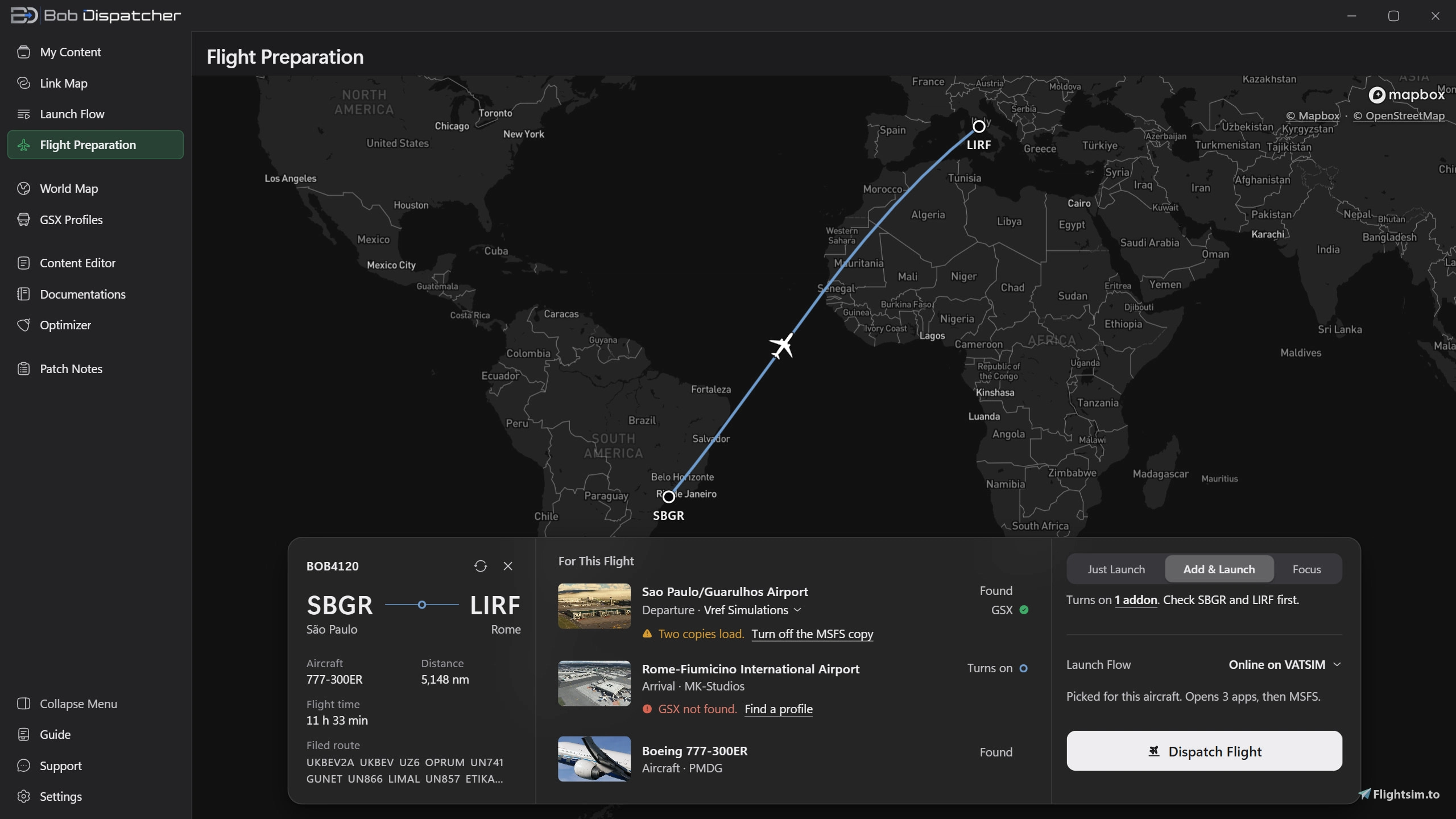
- Bob turns on the departure and arrival sceneries, your aircraft and the addons linked to it, shows the GSX status for each airport, and starts MSFS with your apps in the order you set.
FEATURES
My Content
- Every addon in one place, with pictures, filters by type, region, country and creator, and one-click on and off.
- Clear on and off state, plus Edit, Move to Community and Delete on every card.
- Groups and a Bulk Editor to switch many addons at once.
- Community Viewer: see your real Community folder, colour coded.
Link Map
- Link addons so they turn on together, like an aircraft and its liveries, or an aircraft and its sound pack.
- Make a link work only for some flights: by departure or arrival airport, country, aircraft type or airline (search airlines by name or code).
- Write links as plain sentences: "When this aircraft turns on, only if the flight goes to Brazil, also turn on that scenery".
- Base packages turn on by themselves when an addon needs them.
- Flight Preparation
- From a SimBrief plan or a typed route to a ready sim, in one button.
- Smart airport search by code, city or name, and aircraft search by type.
- GSX profile status for each airport of your flight.
Launch Flow
- Open your companion apps (SimBrief, Navigraph, VATSIM and IVAO clients, hardware and sound tools, websites) around MSFS, in the order and with the waits you choose.
- Presets for each kind of flying, tied to an aircraft if you want. Duplicate a preset in one click.
- Bob can close your apps when MSFS closes.
World Map
- Every airport you own on one map, on a flat map or a globe, with filters for on, off and streamed airports.
More tools
- GSX Profiles: see and manage GSX profiles for your airports.
- Content Editor: edit Content.xml safely, with backups you can restore.
- Documentations: the manuals of your addons in one place, with PDF, text and Markdown preview.
- Optimizer: a PC checkup for MSFS that checks Windows, your graphics driver and MSFS settings, and fixes the safe things in one click.
- Built-in Guide that explains every page step by step.
- Support inside the app
- Report a problem from the Support page and read our answer right in Bob.
ALWAYS UP TO DATE
Bob updates itself. Current version: 1.5.10.
Changelog
Bob 1.4.2 makes Link Map rules a drag away, gives you a direct line to the team inside Bob, and brings a new start screen. Everything you had carries over. ## Highlights - Drag a condition onto a link. Build a condition once, like "only flights to Brazil" or "only airline RYR", and it waits in a tray on the Link Map. Drag it onto any link and that link turns the second addon on only for flights that match. - Answers inside Bob. Report a problem from the Support page and read the team's answer right in Bob, with a dot on Support when it arrives. - Tell us how each version works for you. A new Feedback page in the side menu: stars, the areas to improve and a message. Your answer is saved without your license, PC name, email or IP address. - A new start screen and a sharper icon. The Bob mark is drawn over a quiet jet bridge while Bob opens, and the icon is crisp in the taskbar and the tray. ## New - Add Link: one place to link two addons, read as a sentence, with Every Time or Some Flights. - World Map: choose Flat or Globe next to the zoom buttons. - My Content cards: Edit, Move to Community and Delete on every card. Delete waits 3 seconds before you can click it. - Launch Flow: duplicate a preset, and New Preset for an Aircraft on your first and starred preset. - Messages from the Bob team: a short note now and then about updates or maintenance, never while you fly. Patch Notes keeps them under Messages. ## Changes - My Content: the switch is green when an addon is on, an addon that is off looks clearly darker, and Bulk Editor and Marketplace sit on the filters row. - Link Map: opens centred on your cards, and its shortcuts are one row of keys at the bottom. - World Map: the airport label shows the code and the name together, and the filters sit under the title. - Report a Problem: shows what is attached before you send, and warns when your email address can't receive mail. - Flight Preparation has a blue look in the side menu. - Support starts with Discord and the website, and Credits name every source Bob uses. - Loading inside Bob shows the Bob mark drawing itself, and empty pages carry a faint Bob mark.
User Reviews

DXB_SUQAD
VerifiedOct 9, 2026
I think this message should appear during the initial installation. A screen popped up asking whether to link the add-ons immediately, so I chose to manually configure and move them to a different drive; unfortunately, this caused the original files to get completely messed up. I wasted a lot of time reinstalling all the existing airports; moving them from a completely different folder is the way to go. That said, I am satisfied with the updates so far—they are quite intuitive and work well—though the GSX profile screen still has parts that are difficult to understand.

Thank you for the detail, this is the kind of report that actually changes the app. You are right that the warning belongs at the start. The setup has been reworked since your review: Bob now explains in plain words what it is about to do before it touches a single folder, and Settings has a "Move Everything Back" button that returns every addon to where it came from, in one go. Sorry about the time you lost reinstalling those airports. On the GSX profile screen, tell me which part is hard to follow and I will rewrite it. You can reach me from Support inside Bob, or at support@bobdispatcher.com. In the meantime the Guide page in the app has a GSX Profiles article that walks through the screen step by step. Thanks for sticking with it.

Mingo01
VerifiedOct 7, 2026
Didn't work properly with my MSFS2020. I found no way to load more than one file in one time in the Bob's folder. In most of the files there were no thumbnails, only placeholders. So I deleted the program. Thereby most of my original files in the community folder were heavily damaged. I had to restore them file by file. I don't know, what was wrong in my installation.
Sorry for the trouble, and thank you for writing down exactly what you saw. Every point you raise has been dealt with since, so here is what happened and what changed. Your files were not damaged. Bob moves an addon into its own library folder and leaves a shortcut in your Community folder pointing at it. That is how it turns addons on and off without ever copying them twice. Deleting the program while your addons still lived in its folder left those shortcuts pointing at nothing, so Community looked wrecked while every file was still safe on your disk. Since Bob 1.4.10, uninstalling Bob offers to move everything back first, and "Move Everything Back" is also a button in Settings, General, at any time. More than one file at a time: Install from Archive takes several files in one go, and you can drop a batch of folders or archives straight onto My Content. Thumbnails: pictures come from our catalog of known addons, so anything the catalog does not know yet shows a plain placeholder. That catalog has grown a lot, and since Bob 1.5 new names and pictures reach your app within five minutes instead of waiting for an update. MSFS 2020: Bob works with a 2020 Community folder, and setup lets you pick which simulator it should look after. 1.5.7 also fixed Marketplace airports made for 2020 whose code sits after the maker's name, so they show as airports again. If you feel like giving it another go, write to support@bobdispatcher.com or use Report a Problem on the Support page in Bob. I read those myself, and I will walk you through the setup and get your Community folder back in order.
pilotedebusblanc
VerifiedSep 6, 2026
Hello, I’d just like to make a suggestion. I don't think moving the files is a great idea; why not offer an option to either move them or not? Also, could there be a language selection option? Thanks in advance.
Thank you, and your suggestion is in the app now. Since Bob 1.4.10 and Bob 1.5 you choose what happens: setup shows the plan before anything moves, with "Leave as Is" and "Choose Which Ones" right there, and nothing is touched until you click Organize. My Content also lists the addons Bob does not manage, with a yellow Community or blue Marketplace plate, so your whole Community folder is visible in one place and you move only what you want, one card at a time with "Move to Bob". And if you change your mind, "Move Everything Back" in Settings returns everything to Community. Language selection is not there yet. Bob is English only today, and your request is on the list with the others. If you have more ideas, the Feedback page in Bob goes straight to me. A good part of the last three updates came from exactly that.
BravoLimaSierra
VerifiedAug 27, 2026
Excelent Tool, help a lot with many addon
Thank you. Big libraries are what Bob is built for, so that is good to hear. A lot has landed since August: your whole Community folder and your Marketplace addons are listed in My Content, Content Sets remember which set is on, the Link Map opens with everything in view, and Support is now a conversation inside the app. If anything ever looks off, Report a Problem on the Support page reaches me directly.

r0xbeat
VerifiedAug 24, 2026
Great Tool.
Thank you, much appreciated. Bob has grown a fair bit since August: every addon MSFS loads is now visible in My Content, setup shows its plan before it moves anything, and updates come about every two weeks. If you ever need anything, Report a Problem on the Support page in Bob comes straight to me.
Bob Dispatcher
Bob Dispatcher is a desktop content manager for Microsoft Flight Simulator 2020 and 2024, designed to streamline pre-flight workflows. It organizes and manages your add-on library, allowing automatic package toggling, filtering, and installation. The tool integrates with SimBrief for route-based add-on selection, manages dependencies, and enables or disables airports via an interactive globe. Additional features include bulk launching of flight utilities, cache clearing, and tools for viewing package manifests and GSX coverage.
Instant digital delivery • Secure payment
Requirements
Additional Requirements
- OS: Windows 10 (64-bit, build 17763+) or Windows 11
- Required: Microsoft Flight Simulator 2024 (Steam or Microsoft Store) or/and Microsoft Flight Simulator 2020 (Steam or Microsoft Store)
- Internet: broadband, for activation, use and updates all the time.
- Disk: ~50 MB
- RAM: if MSFS runs, Bob runs.
Details
- Category
- Utilities
- Release Date
- Aug 13, 2026
- Last Updated
- Oct 9, 2026
- Reviews
- 5
- Compatibility
- MSFS2024